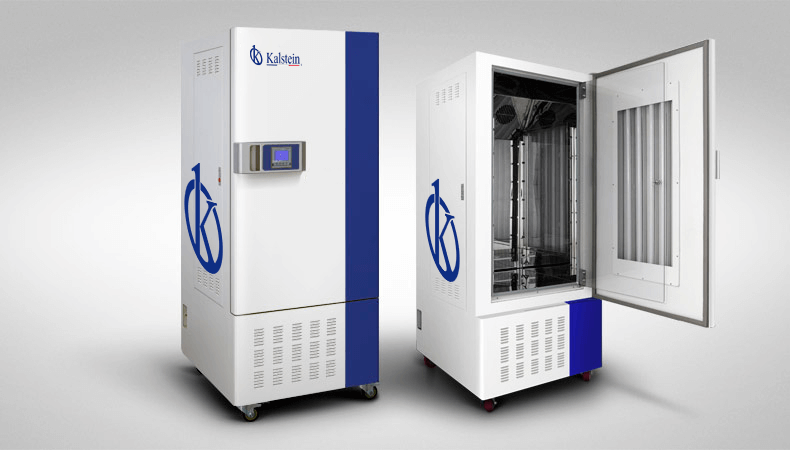
Common Errors and Troubleshooting Symptoms of the YR05347 Climate Simulation Camera
The YR05347 Climate Simulation Camera is an essential tool in laboratory settings, enabling the simulation of various environmental conditions to facilitate accurate experiment conditions. However, like all technical equipment, it may experience operational challenges. Understanding these common errors and their resolutions is vital for maintaining optimal functionality and ensuring reliable results.
Technical Specifications Overview of the YR05347
| Specification | Details |
|---|---|
| Model | YR05347 |
| Convection Mode | Forced Convection |
| Control System | Thirty-stage Microprocessor PID Controller |
| Temperature Range | 10~65 ℃ (with lighting) / 0~60 ℃ (without lighting) |
| Temperature Accuracy | 0.1 |
| Humidity Range | 50~90% RH, Humidity Fluctuation: ±3% RH |
| Power Supply | AC220V/50Hz |
| Net Weight | 162 kg |
| Dimensions (L × W × H) | 1780×710×775 mm |
Troubleshooting Common Errors
In the operation of the YR05347 Climate Simulation Camera, users may encounter specific errors that can affect its performance. Below are some common symptoms, their probable causes, and recommended solutions.
1. Equipment Does Not Power On
If the YR05347 does not power on, several issues may be at play. Check the following:
- Power Supply Issues: Verify that the unit is correctly plugged in and that the outlet is functional.
- Fuse or Circuit Breaker: Inspect for a blown fuse or tripped circuit breaker in the electrical supply.
- Internal Power Supply Failure: If the above steps do not resolve the issue, the internal power supply may need replacement.
2. Error Code E-03
Error code E-03 often indicates a temperature sensor malfunction. To address this issue:
- Check Sensor Connections: Ensure that the temperature sensor is properly connected and not damaged.
- Calibrate Sensor: Perform a recalibration of the temperature sensor to ensure accurate readings.
- Replace Sensor: If the error persists, consider replacing the temperature sensor.
3. Inconsistent Readings
Inconsistent temperature or humidity readings may arise from various factors:
- Calibration Issues: Regularly calibrate the unit to maintain accuracy.
- Airflow Obstructions: Ensure that vents are clear and airflow is not restricted.
- Environmental Interference: Check for external environmental factors affecting readings.
Symptom → Cause → Solution Table
| Symptom | Probable Cause | Solution |
|---|---|---|
| Equipment Does Not Power On | Power supply issues or internal failure | Check outlet, replace fuse, or inspect internal power supply |
| Error Code E-03 | Temperature sensor malfunction | Check connections, recalibrate, or replace sensor |
| Inconsistent Readings | Calibration issues or airflow obstructions | Calibrate regularly, clear vents, check for external factors |
Preventive Measures for YR05347
Implementing preventive maintenance can help avoid common issues with the YR05347.
- Regular Calibration: Schedule regular calibration of temperature and humidity sensors to maintain accuracy.
- Routine Cleaning: Keep the unit clean and free of dust and debris that could obstruct airflow.
- Monitor Environmental Conditions: Ensure that the unit is placed in an environment that meets its operational requirements.
Frequently Asked Questions
What should I do if the YR05347 displays an error code?
If the YR05347 displays an error code, refer to the user manual for specific error code meanings. Begin troubleshooting by identifying the probable cause of the error.
How often should I calibrate the YR05347?
It is advisable to calibrate the YR05347 at least once every 6 months or more frequently if used in critical applications.
Can I use third-party sensors with the YR05347?
While third-party sensors may fit, it is recommended to use original parts from the manufacturer to ensure compatibility and reliable performance.
What environmental conditions are optimal for the YR05347?
The ideal environment for operating the YR05347 is a temperature range of 10-30 ℃ and humidity below 70% RH.
How can I extend the lifespan of my YR05347 unit?
To extend the lifespan of your YR05347, perform regular maintenance, avoid overloading the unit, and ensure it is operating within specified environmental conditions.
What are the common symptoms of sensor failure in the YR05347?
Common symptoms of sensor failure include erratic readings, error codes indicating sensor malfunction, and inability to maintain set parameters.
Where can I find replacement parts for the YR05347?
Replacement parts for the YR05347 can typically be obtained from the manufacturer or authorized distributors. Check with your supplier for availability.
If you are looking for a fusion of innovation and quality, you have come to the right place. At Kalstein, we offer you the luxury of exploring our exclusive catalog of laboratory equipment. We manufacture every device to the highest standards of excellence. Our intuitive and seamless online purchasing channels are designed for your convenience, securing the most competitive prices. Hesitate no longer — we bring science to life, it is time to become part of our community.