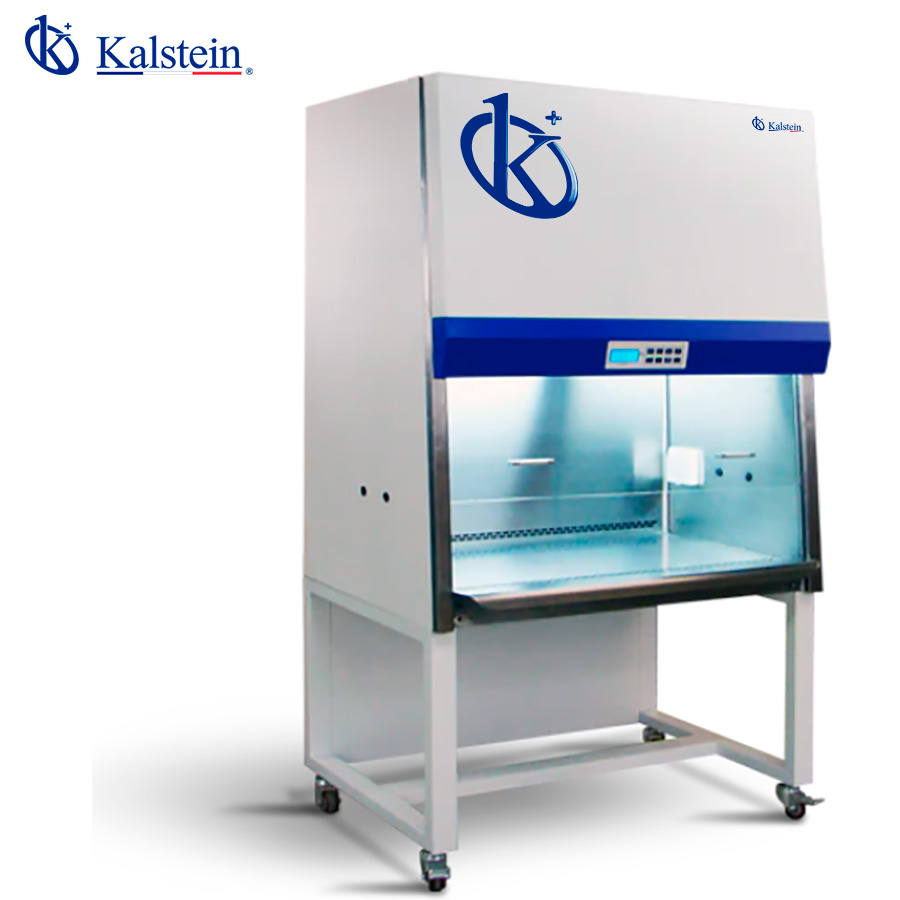
Common Errors and Troubleshooting Symptoms of the YR06203 Biological Safety Cabinet
The YR06203 Biological Safety Cabinet is an essential tool for ensuring safety and efficiency when handling hazardous biological materials in laboratory settings. Its advanced filtration system and precise airflow control provide protection for both the operator and the samples. However, like any sophisticated piece of equipment, it can experience issues that require troubleshooting. This article outlines common errors, their symptoms, and effective solutions specifically related to the YR06203 model.
Technical Specifications of the YR06203
| Model | YR06203 |
|---|---|
| Cleaning Classification | ISO14644.1 CLASS 5 (US209E, CLASS 100) |
| Inflow Velocity | 0.53 m/s |
| Downflow Velocity | 0.35 m/s |
| Downflow Velocity Accuracy | ±0.015 m/s |
| Noise Level (dB) | ≤65 |
| Vibration | ≤3μm (X, Y, Z direction) |
| HEPA Efficiency | 99.995% |
| Light Intensity (LX) | ≥650 |
| Pressure Differential Range (Pa) | 0~500 |
| Operating Environment | Ambient temperature 10-30°C, relative humidity < 70%, no visible vibrations or dust |
| External Dimensions (H*W*D) (mm) | 2060×1035×740 |
| Working Area Dimensions (H*W*D) (mm) | 670×965×560 |
| Power Supply | Single-phase AC220V/50Hz |
| Power (W) | 300 |
Troubleshooting Symptoms of the YR06203
When working with the YR06203 Biological Safety Cabinet, operators may encounter various symptoms that indicate the need for troubleshooting. Below are some common symptoms categorized by issues that may arise while operating this cabinet.
Equipment Does Not Power On
If the YR06203 Biological Safety Cabinet does not power on, check the following:
- Power Supply: Ensure that the power outlet is functioning and that the cabinet is properly plugged in.
- Power Switch: Verify that the power switch is turned on.
- Fuse: Inspect the internal fuse for any signs of damage or failure.
Solution: Replace any faulty components, and ensure the power supply is stable.
Error Code E-03 Displayed
Error code E-03 typically indicates a malfunction in the airflow system. Troubleshoot this by:
- Checking Filters: Inspect HEPA filters for clogs or damage.
- Flow Sensor: Ensure that the airflow sensor is functioning correctly and is not obstructed.
Solution: Clean or replace HEPA filters as necessary, and calibrate the airflow sensor.
Inconsistent Airflow Readings
Inconsistent airflow can compromise safety. To address this issue:
- Check Calibration: Ensure that the cabinet is properly calibrated for airflow.
- Inspect Ductwork: Look for blockages in the ductwork connected to the cabinet.
Solution: Recalibrate the cabinet and clear any obstructions in the ductwork.
Noise Level Exceeds 65 dB
A noise level exceeding 65 dB may indicate a malfunction. Steps to troubleshoot include:
- Inspect Fan Operation: Check for any unusual noises from the fan.
- Vibration Inspection: Assess if the cabinet is properly leveled to minimize vibration.
Solution: Replace the fan if necessary, and adjust leveling to reduce vibration.
Symptom-Cause-Solution Matrix
| Symptom | Possible Cause | Solution |
|---|---|---|
| Equipment does not power on | Power supply issue | Check outlet and power connection |
| Error code E-03 | Airflow malfunction | Inspect and replace HEPA filters |
| Inconsistent airflow readings | Calibration issue | Recalibrate the cabinet |
| Noise level exceeds 65 dB | Fan malfunction | Replace the fan and level the cabinet |
Preventative Maintenance for the YR06203
Regular maintenance is essential to keep the YR06203 operating efficiently. Here are key maintenance practices:
- HEPA Filter Replacement: Replace filters according to the manufacturer’s recommendations.
- Calibration: Schedule periodic calibration to ensure accurate airflow measurements.
- Visual Inspections: Routinely check for any signs of wear or damage.
By adhering to a maintenance schedule, operators can minimize the risk of errors and ensure a safe working environment.
Frequently Asked Questions
What should I do if I see an error message on the YR06203 cabinet?
If you see an error message, consult the troubleshooting section of the manual or refer to the symptom-cause-solution matrix provided above for appropriate actions.
How often should the HEPA filters be replaced in the YR06203?
HEPA filters should typically be replaced every 6 to 12 months, depending on usage and environmental conditions. Regular checks should be performed to assess their condition.
Can I perform maintenance on the YR06203 without professional help?
Some basic maintenance tasks can be performed by trained personnel, such as filter replacement and cleaning, but for calibrations and repairs, it is recommended to consult a professional technician.
What is the maximum weight that the work surface of the YR06203 can support?
The work surface of the YR06203 is designed to hold laboratory equipment and samples safely. Always refer to the manufacturer’s specifications for weight limits to avoid overloading.
Is the YR06203 suitable for all laboratory environments?
The YR06203 is best suited for biological laboratories and environments that require strict control over contamination. Ensure that the installation area meets the required specifications for optimal performance.
If you are looking for a fusion of innovation and quality, you have come to the right place. At Kalstein, we offer you the luxury of exploring our exclusive catalog of laboratory equipment. We manufacture every device to the highest standards of excellence. Our intuitive and seamless online purchasing channels are designed for your convenience, securing the most competitive prices. Hesitate no longer — we bring science to life, it is time to become part of our community.