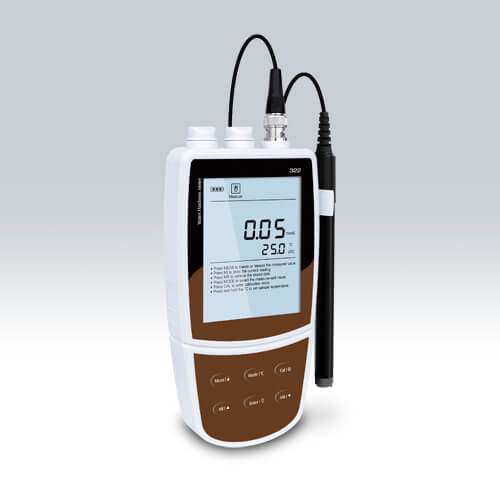
Environmental Conditions and Installation Requirements for the YR01820 Water Quality Meter
The YR01820 multi-parameter portable water quality meter is an essential tool for measuring various water quality parameters, including pH, ORP, conductivity, TDS, salinity, and dissolved oxygen. Understanding the environmental conditions and installation requirements for using this device is critical to ensuring accurate and reliable measurements.
Overview of YR01820 Specifications
| Model | YR01820 |
|---|---|
| pH Range | -2.000 to 20.000 pH |
| pH Accuracy | ±0.002 pH |
| ORP Range | ±1999.9 mV |
| Conductivity Range | 0.01 to 2000 mS/cm |
| Temperature Range | 0 to 105°C |
| Memory | Stores up to 500 data sets |
| Power Supply | 3 AA batteries or DC 5V adapter |
Site Requirements for YR01820 Operation
To ensure the optimal performance of the YR01820, certain site requirements must be met. Understanding these specifications will enhance reliability and accuracy in measurements.
- Temperature Range: The operating temperature for the YR01820 should be maintained between 0 to 105°C, avoiding extremes that may affect performance.
- Humidity: Relative humidity levels should be controlled to prevent condensation on the device, which might lead to erroneous readings.
- Voltage and Frequency: Ensure the power supply is stable at DC 5V. A consistent power source is crucial to maintain device functionality.
- Ventilation: Adequate ventilation is important to prevent overheating, particularly in environments where the device may be exposed to direct sunlight.
- Vibration and Electromagnetic Interference (EMI): Minimize exposure to vibrations and EMI sources that can interfere with readings and calibration.
Installation Requirements
Proper installation is fundamental for the YR01820 to function correctly. Below is a checklist of installation requirements:
- Unboxing: Carefully check that all components are included, including the meter, probes, and user manual.
- Leveling and Positioning: Place the YR01820 on a stable, flat surface away from direct sunlight and extreme temperatures.
- Powering Up: Connect the device to the power source and ensure it is functioning correctly before first use.
- Calibration: Perform the calibration process as per the manufacturer’s guidelines. This typically involves using standard buffers for accurate pH measurements.
- Data Setup: Configure the device settings, including language, date, and time, to ensure proper functioning.
Common Installation Mistakes and Solutions
Awareness of common installation mistakes can prevent issues during setup:
| Mistake | Consequence | Solution |
|---|---|---|
| Incorrect Calibration | Inaccurate readings | Follow calibration guidelines strictly using appropriate buffers. |
| Poor Ventilation | Overheating | Ensure proper airflow around the device. |
| Improper Power Supply | Device malfunction | Use a reliable power source and check voltage specifications. |
Environmental Conditions for Accurate Measurements
Environmental factors can significantly impact the accuracy of the YR01820’s readings. Below are the preferred conditions:
- Temperature: Consistent operating temperature is crucial; fluctuations can lead to measurement errors.
- Clean Water Sources: Ensure that samples are free from contaminants that may skew results.
- Stable Locations: Measurements should be taken in locations with minimal movement to avoid disruption during readings.
Frequently Asked Questions
What are the optimal environmental conditions for using the YR01820?
The optimal conditions for the YR01820 include a stable temperature range between 0 to 105°C, low humidity to prevent condensation, and a stable power supply at 5V.
How do I calibrate the YR01820 for accurate pH measurements?
Calibration involves selecting standard buffer solutions that correspond to the pH range being measured. Follow the manufacturer's guidelines for proper calibration procedures.
What common installation errors should I avoid with the YR01820?
Common errors include improper calibration, poor ventilation leading to overheating, and using an unreliable power source. It's essential to ensure proper setup and regular checks.
How can environmental factors affect measurements from the YR01820?
Temperature fluctuations can cause measurement inaccuracies. Additionally, contaminants in water samples can lead to erroneous readings, making clean and stable conditions vital.
What maintenance is required to ensure the YR01820 operates effectively?
Regular calibration, cleaning of probes, and ensuring the device is stored properly will help maintain accuracy and prolong its lifespan.
Can the YR01820 be used in outdoor environments?
Yes, but precautions should be taken to shield it from extreme temperatures and direct sunlight, which could affect measurements.
Is there a specific setup checklist for the YR01820?
Yes, ensure to check the unboxing items, install on a flat surface, connect to a stable power source, calibrate properly, and configure device settings before use.
If you are looking for a fusion of innovation and quality, you have come to the right place. At Kalstein, we offer you the luxury of exploring our exclusive catalog of laboratory equipment. We manufacture every device to the highest standards of excellence. Our intuitive and seamless online purchasing channels are designed for your convenience, securing the most competitive prices. Hesitate no longer — we bring science to life, it is time to become part of our community.