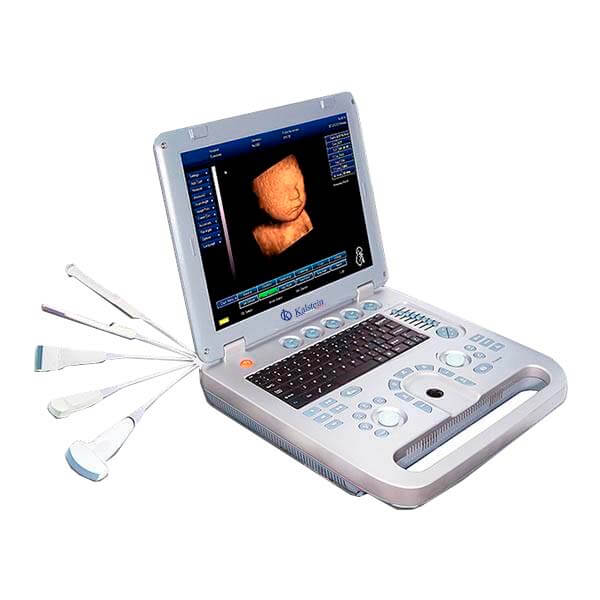
Frequent Errors and Troubleshooting Symptoms for the YR05147 Ultrasound
The YR05147 ultrasound system is a sophisticated device designed for various medical applications, particularly in obstetrics and gynecology. Like any advanced instrument, it may encounter issues that require troubleshooting. This guide will address common symptoms, probable causes, and solutions to help maintain optimal functionality of the YR05147.
Understanding the YR05147 Ultrasound System
The YR05147 is a PC-based ultrasound device that supports 3D imaging and offers seamless connectivity with printers of various brands. It features an integrated software system, a built-in battery for portability, and multiple automatic reporting options across various medical specialties. Understanding this device's nuances is crucial for effective troubleshooting.
Technical Specifications of the YR05147
| Model | YR05147 |
|---|---|
| Warranty | 2 years |
| Post-Sales Service | Return and Replacement |
| Instrument Classification | Class II |
| Type | Portable ultrasound diagnostic device |
| Battery | Continuous operation for over 3 hours |
| USB Ports | 2 USB ports for flash and laser printer connectivity |
| Specialty | General, OB/GYN, vascular, cardiology, urinary, small organs |
| Imaging Mode | 2D, 3D manual |
| Image/Video Format | AVI, JPG, BMP, PNG, TIF, DICOM |
| TGC | 8-segment TGC, precise near/far gain adjustment |
| Cine Loop | 512 frames (automatic/manual) |
| Printer | Compatible with any printer |
| Multilingual Functionality | Available in English, Chinese, Spanish, Portuguese, French |
Troubleshooting by Symptoms
This section addresses common symptoms encountered when using the YR05147 ultrasound, outlining probable causes and effective solutions.
Equipment Does Not Power On
If the YR05147 does not turn on, check the following:
- Ensure the device is properly charged or plugged in.
- Verify the power source is functioning.
- Inspect the power cable for damage.
**Solution:** Charge the device for at least 2 hours before attempting to power it on again. If it still does not turn on, consider contacting support for further assistance.
Error Code E-03 Displayed
Error code E-03 usually signifies a software malfunction. Potential causes include:
- Corrupted software installation.
- Incompatible printer settings.
- Network connectivity issues.
**Solution:** Restart the device and check for software updates. Reset printer settings and ensure proper network configuration.
Inconsistent Readings
Inconsistent readings can occur due to several factors:
- Improper probe placement.
- Degradation of ultrasound gel.
- Environmental interferences.
**Solution:** Ensure correct probe positioning and replace ultrasound gel if necessary. Check for any external factors that may affect the readings.
Symptom-Cause-Solution Matrix
| Symptom | Probable Cause | Solution |
|---|---|---|
| Equipment Does Not Power On | Low battery or faulty power supply | Charge device; check power connections |
| Error Code E-03 | Software or printer issues | Restart device; check software updates |
| Inconsistent Readings | Probe placement or gel issues | Reposition probe; replace gel |
Frequently Asked Questions
What are the common troubleshooting steps for the YR05147 ultrasound?
Common troubleshooting steps for the YR05147 involve checking power connections, inspecting the ultrasound gel, and ensuring proper probe placement. Additionally, updating the software and resetting settings may resolve many issues.
How can I resolve error codes on the YR05147?
To resolve error codes, first consult the user manual for specific codes. Restarting the device or updating the software often resolves minor software issues.
What maintenance is required for the YR05147 ultrasound?
Regular maintenance includes cleaning the device after each use, checking for software updates, and ensuring that the probe is functioning correctly. It’s also important to periodically check battery health and connectivity options.
How long does the battery last on the YR05147?
The built-in battery on the YR05147 can operate continuously for over 3 hours, making it suitable for portable settings and extended use cases.
Can the YR05147 connect to any printer?
Yes, the YR05147 ultrasound system is designed to connect with any printer, allowing for flexible printing options depending on your facility’s resources.
Conclusion and Call to Action
If you are looking for a fusion of innovation and quality, you have come to the right place. At Kalstein, we offer you the luxury of exploring our exclusive catalog of laboratory equipment. We manufacture every device to the highest standards of excellence. Our intuitive and seamless online purchasing channels are designed for your convenience, securing the most competitive prices. Hesitate no longer — we bring science to life, it is time to become part of our community.