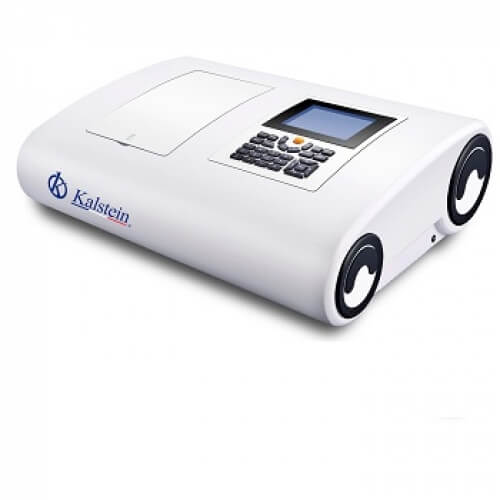
Installation and Commissioning Guide for the YR01865 Double Beam Spectrophotometer
The YR01865 double beam spectrophotometer is a sophisticated instrument designed to deliver precise and reliable measurements across a range of applications. This guide will walk you through the essential steps to successfully install and commission your spectrophotometer, ensuring you can take full advantage of its capabilities.
Unboxing Checklist
When you receive your YR01865, it's vital to conduct an unboxing inspection. This ensures that all components are included and undamaged. Here’s what to check:
- YR01865 Spectrophotometer unit
- Power cord
- USB data cable
- Operator's manual
- Calibration standards (if included)
- Additional accessories (if ordered)
Site Requirements
Before installation, ensure that your site meets the necessary requirements for optimal operation of the YR01865. Below is a checklist:
| Requirement | Specification |
|---|---|
| Temperature Range | 15 - 30 °C |
| Humidity | 30 - 70% (non-condensing) |
| Voltage | 220V AC / 50Hz or 110V AC / 60Hz |
| Vibration | Minimal (ensure a stable surface) |
| Clearance | At least 30 cm on all sides |
Power-Up Sequence
Follow these steps to power up your YR01865 safely:
- Connect the power cord to the back of the instrument.
- Plug the other end into a power outlet that meets the specified voltage.
- Press the power button located on the front panel.
- Wait for the display to power up and show the initialization screen.
Initial Calibration and Setup
After powering up the YR01865, you must perform an initial calibration:
- Access the calibration menu from the main screen.
- Select the option for baseline calibration.
- Follow the on-screen instructions to complete the calibration process using the provided standards.
- Record the calibration data for future reference.
Common Setup Mistakes
When commissioning the YR01865, avoid these common mistakes:
- Not leveling the instrument before use, which can lead to inaccurate measurements.
- Incorrectly connecting the USB data cable, which can prevent data transfer to a PC.
- Skipping the baseline calibration, as this is critical for accurate results.
Technical Specifications of YR01865
| Model | YR01865 |
|---|---|
| Optical System | Double beam, 1200 lines/mm grating |
| Wavelength Range | 190-1100 nm |
| Bandwidth | 0.5, 1.0, 2.0, 4.0 nm |
| Wavelength Accuracy | ± 0.1 nm (D2 656.1 nm) |
| Photometric Accuracy | ± 0.2% T (0-100% T) |
| Output Data Port | USB |
| Weight | 32 kg |
| Dimensions | 625 x 430 x 206 mm |
Frequently Asked Questions
What are the key features of the YR01865 double beam spectrophotometer?
The YR01865 features a double beam optical system, a wavelength range of 190-1100 nm, and a bandwidth of 0.5 nm. It provides high accuracy and precision, making it suitable for a variety of laboratory applications.
How do I connect the YR01865 to a computer for data analysis?
To connect the YR01865 to a computer, use the USB data cable provided. Ensure that the software for data analysis is installed on your PC, then follow the instructions in the manual for data transfer procedures.
What common issues might arise during installation of the YR01865?
Common issues may include improper leveling of the unit, incorrect power supply connections, and failure to perform initial calibration. Following the outlined steps in this guide can help mitigate these problems.
How often should I perform maintenance on the YR01865?
Regular maintenance should be done according to the manufacturer's recommendations, typically involving cleaning the optical components and recalibrating the unit at specified intervals to ensure optimal performance.
Can the YR01865 be used for both qualitative and quantitative analysis?
Yes, the YR01865 is capable of performing both qualitative and quantitative analyses, making it versatile for various applications in laboratories, including clinical and research settings.
What should I do if the YR01865 displays an error message?
If the YR01865 displays an error message, refer to the troubleshooting section in the operator's manual. Identify the error code and follow the provided solutions to resolve the issue.
If you are interested in acquiring the YR01865 or require further details, feel free to request a quote on Kalstein Plus.
If you are looking for a fusion of innovation and quality, you have come to the right place. At Kalstein, we offer you the luxury of exploring our exclusive catalog of laboratory equipment. We manufacture every device to the highest standards of excellence. Our intuitive and seamless online purchasing channels are designed for your convenience, securing the most competitive prices. Hesitate no longer — we bring science to life, it is time to become part of our community.