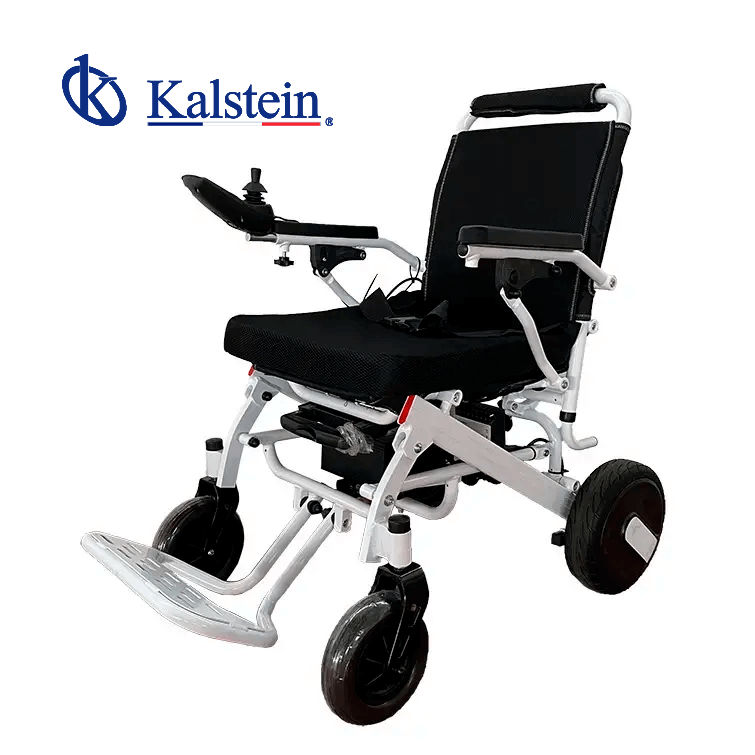
Installation and Commissioning Guide for the YR05444 Electric Wheelchair
The YR05444 Electric Wheelchair is designed for ease of use and convenience, making it an excellent choice for individuals seeking mobility assistance. This guide will provide detailed instructions on the installation and commissioning of the YR05444, ensuring that users can start utilizing their wheelchair without confusion or complications.
Unboxing and Initial Setup
When you first receive your YR05444 Electric Wheelchair, it's essential to ensure that you have all the necessary components and accessories. The unboxing process should include the following items:
- YR05444 Electric Wheelchair
- User Manual
- Power Adapter
- Remote Control
- Tool Kit for Assembly
Once you have confirmed that all items are included, proceed to check the wheelchair for any visible damage. If any damage is found, contact the supplier immediately.
Assembly Instructions
To set up your YR05444 Electric Wheelchair, follow these steps:
- Attach the armrests by aligning them with the designated slots and securing them with screws provided in the tool kit.
- Install the footrest if it’s not pre-installed by sliding it into place and securing it tightly.
- Charge the battery before the first use. Connect the power adapter to the wheelchair and plug it into a wall outlet.
Make sure to charge the battery for at least 6-8 hours before the initial use for optimal performance.
Power-Up Sequence
After assembly, it's time to power up the YR05444 Electric Wheelchair. Follow this simple sequence:
- Ensure the wheelchair is fully charged.
- Locate the power switch, typically located near the battery compartment or on the control panel.
- Turn on the power switch and wait for the control panel indicators to light up.
Once powered on, the system will perform a self-check. If any errors occur, consult the user manual for troubleshooting steps.
First-Run Calibration
Calibrating the YR05444 ensures optimal performance. Follow these steps:
- Ensure that the wheelchair is on a flat surface.
- Use the remote control to navigate forward and backward to test all functionalities.
- Check the turning radius by adjusting the joystick and observing the wheelchair's response.
Calibration is crucial for ensuring the wheelchair responds accurately to user input.
Technical Specifications
| Specification | Details |
|---|---|
| Model | YR05444 |
| Seat Width | 45 cm |
| Seat Depth | 47 cm |
| Seat Height | 51 cm |
| Backrest Height | 44 cm |
| Total Length | 118 cm |
| Average Width | 63 cm |
| Total Height | 93 cm |
| Rear Wheel Size | 12 inches |
| Front Wheel Size | 8 inches |
| Folding Height | 41 cm |
| Folding Length | 80 cm |
| Folding Width | 63 cm |
| Net Weight | 25 KG / 29 KG |
| Frame Material | Aluminum Alloy |
| Load Capacity | 100 KG |
| Operating Range | 15 KM |
| Maximum Speed | 6 km/h |
| Motor | 700W |
| Battery | 24V 12Ah Lithium |
| Brakes | Manual and Electromagnetic |
| Cushion Color | Black |
Troubleshooting Common Issues
Even with proper setup, users may encounter issues while operating the YR05444. Below is a troubleshooting guide that categorizes common symptoms, probable causes, and solutions:
| Symptom | Probable Cause | Solution |
|---|---|---|
| Wheelchair does not power on | Battery not charged | Charge the battery fully |
| Error code E-03 displayed | Motor malfunction | Check motor connections and consult service |
| Inconsistent speed | Battery health issue | Replace battery if necessary |
| Remote control not responding | Battery in the remote is dead | Replace remote control batteries |
Frequently Asked Questions
What are the weight limits for the YR05444 Electric Wheelchair?
The YR05444 has a load capacity of 100 KG, which accommodates a wide range of users. It is important to adhere to this limit to maintain safety and functionality.
How do I maintain the YR05444 Electric Wheelchair?
Regular maintenance includes charging the battery correctly, cleaning the wheelchair frame, and checking brake functionality. It's advisable to consult the user manual for specific maintenance schedules.
What features make the YR05444 stand out?
The YR05444 Electric Wheelchair features a lightweight, foldable design, Bluetooth remote control, and a USB charging port for mobile devices, enhancing user convenience.
Can the YR05444 be used outdoors?
Yes, the YR05444 is suitable for outdoor use. It is equipped with durable wheels that can handle a variety of terrains while maintaining stability and comfort for the user.
What should I do if I encounter an error code?
If you encounter an error code, refer to the user manual for troubleshooting steps. Common issues may be resolved by checking connections or recalibrating the system.
Is the YR05444 Electric Wheelchair easy to transport?
Yes, the YR05444's foldable design makes it easy to transport in vehicles or store when not in use, providing great convenience for users who travel frequently.
How long does the battery last on a full charge?
The YR05444 has an operating range of 15 KM on a full charge, depending on terrain and user weight, ensuring ample mobility for most daily activities.
If you are looking for a fusion of innovation and quality, you have come to the right place. At Kalstein, we offer you the luxury of exploring our exclusive catalog of laboratory equipment. We manufacture every device to the highest standards of excellence. Our intuitive and seamless online purchasing channels are designed for your convenience, securing the most competitive prices. Hesitate no longer — we bring science to life, it is time to become part of our community.