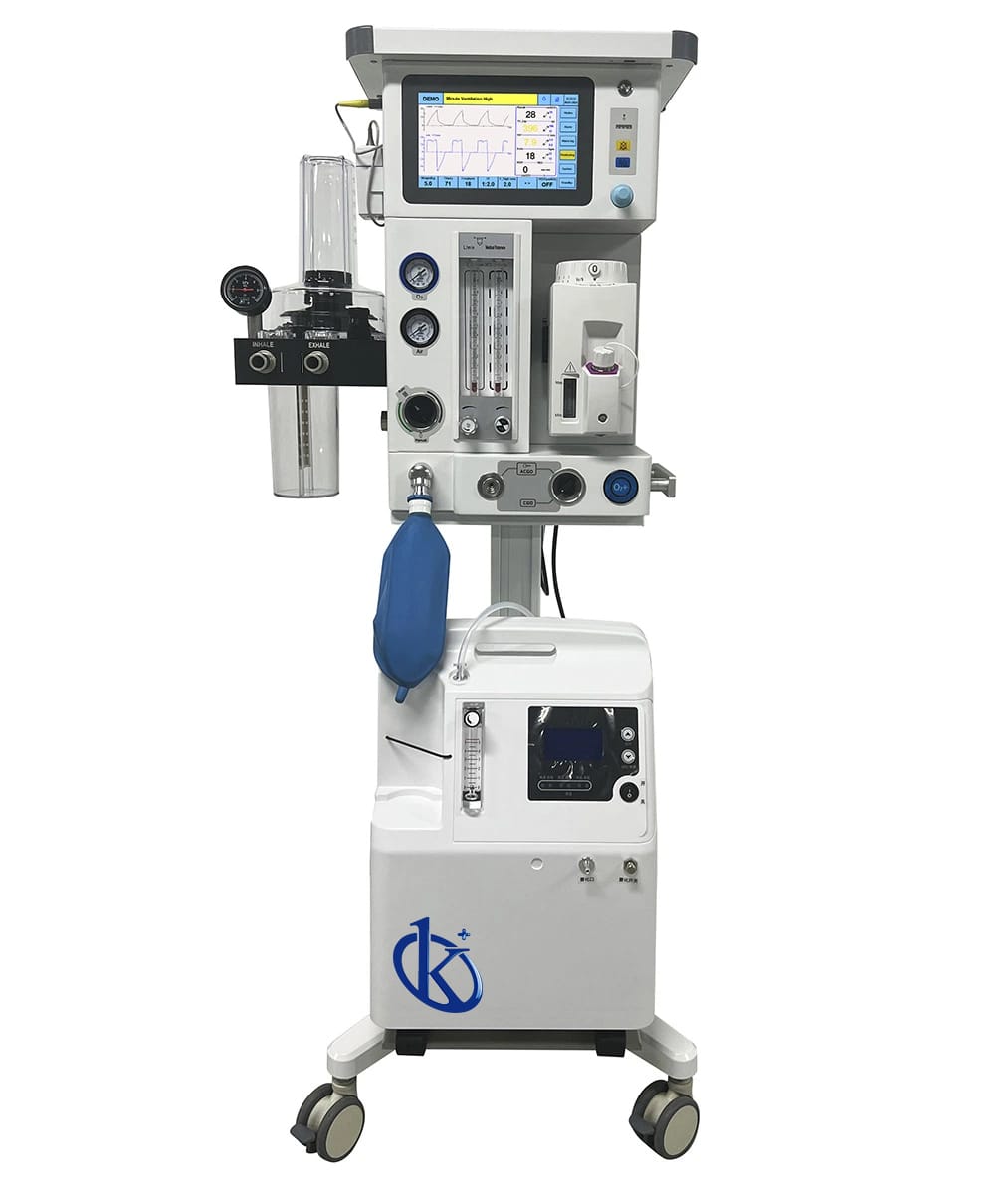
Installation and Commissioning Guide for the YR06101 Turbo-driven Veterinary Anesthesia Machine
The YR06101 Turbo-driven Veterinary Anesthesia Machine is designed to facilitate deep anesthesia in animals, ensuring that they can rely completely on the ventilator for maintaining their respiration. This guide provides a comprehensive overview of the installation and commissioning process for the YR06101, essential for veterinary professionals aiming for seamless operation.
Unboxing the YR06101: Initial Checklist
Before beginning the installation of the YR06101, it is crucial to unbox the machine correctly. Below is a checklist to ensure that all necessary components are accounted for:
- YR06101 Main Unit
- High-quality aluminum trolley
- Oxygen flowmeter
- CO2 absorber
- Ventilation accessories
- Manual and technical specifications
Anchoring and Leveling the Machine
Once the YR06101 has been unboxed, the next step is to securely anchor and level the machine. Here are the steps:
- Select a stable, flat surface for placement.
- Ensure that the aluminum trolley is leveled using a spirit level.
- Anchor the trolley to prevent movement during operation.
Power-Up Sequence for the YR06101
To power up the YR06101, follow this sequence:
- Connect the power cord to a grounded electrical outlet.
- Switch on the main power button located at the back of the unit.
- Wait for the system to perform its self-diagnostics.
Calibrating the YR06101: First-Run Procedures
Calibration is vital to ensure that the YR06101 operates correctly. Here are the steps:
- Set the animal's weight on the control panel.
- Allow the machine to automatically calculate other parameters.
- Verify the pressure settings for ventilation modes: VCV, PCV, SPONT, and MANUAL.
Common Setup Mistakes and How to Avoid Them
It is essential to avoid common pitfalls during setup:
- Ensure all connections are secure to prevent gas leaks.
- Double-check that all calibration parameters are correctly inputted.
- Confirm the power source is suitable for the device requirements.
Technical Specifications of the YR06101
| Specification | Details |
|---|---|
| Model | YR06101 |
| Main Unit | High quality aluminum trolley |
| Application Range | Animal weight 0.8-120 kg |
| CO2 Absorber | Integrated design of animal-specific integrated bellows and absorber |
| Flowmeter | Animal-specific oxygen tube; Flow: 0~1 & 1-10L/min |
| Ventilator Drive Mode | Turbine and electronic control |
| Ventilation Mode | VCV, PCV, SPONT, MANUAL |
| Breathing Rate | 1~100 bpm |
| Pressure Support | 0~60 cmH20 |
| Pressure Control | 5~60 cmH20 |
Frequently Asked Questions
What are the initial setup requirements for the YR06101?
The initial setup requirements include a stable surface for the aluminum trolley, a grounded electrical outlet, and ensuring that all machine components are unboxed and available.
How do I calibrate the YR06101 for different animal weights?
Calibrate the YR06101 by inputting the animal's weight on the control panel, and the machine will automatically calculate the necessary settings for safe anesthesia delivery.
What should I do if the YR06101 does not power on?
If the YR06101 does not power on, check the power connections, ensure the outlet is functioning, and verify that the power switch is turned on.
How can I ensure the accuracy of the YR06101's measurements?
To ensure accuracy, regularly perform calibrations as specified in the user manual and ensure that all ventilation settings are correctly adjusted.
What ventilation modes are available on the YR06101?
The YR06101 offers several ventilation modes, including Volume Controlled Ventilation (VCV), Pressure Controlled Ventilation (PCV), Spontaneous (SPONT), and Manual mode.
How often should maintenance be performed on the YR06101?
Regular maintenance should be performed according to the manufacturer's recommendations, typically every six months, or more frequently based on usage.
Where can I request a quote for the YR06101?
You can request a quote via Kalstein Plus, where we provide competitive pricing and detailed product information.
If you are looking for a fusion of innovation and quality, you have come to the right place. At Kalstein, we offer you the luxury of exploring our exclusive catalog of laboratory equipment. We manufacture every device to the highest standards of excellence. Our intuitive and seamless online purchasing channels are designed for your convenience, securing the most competitive prices. Hesitate no longer — we bring science to life, it is time to become part of our community.