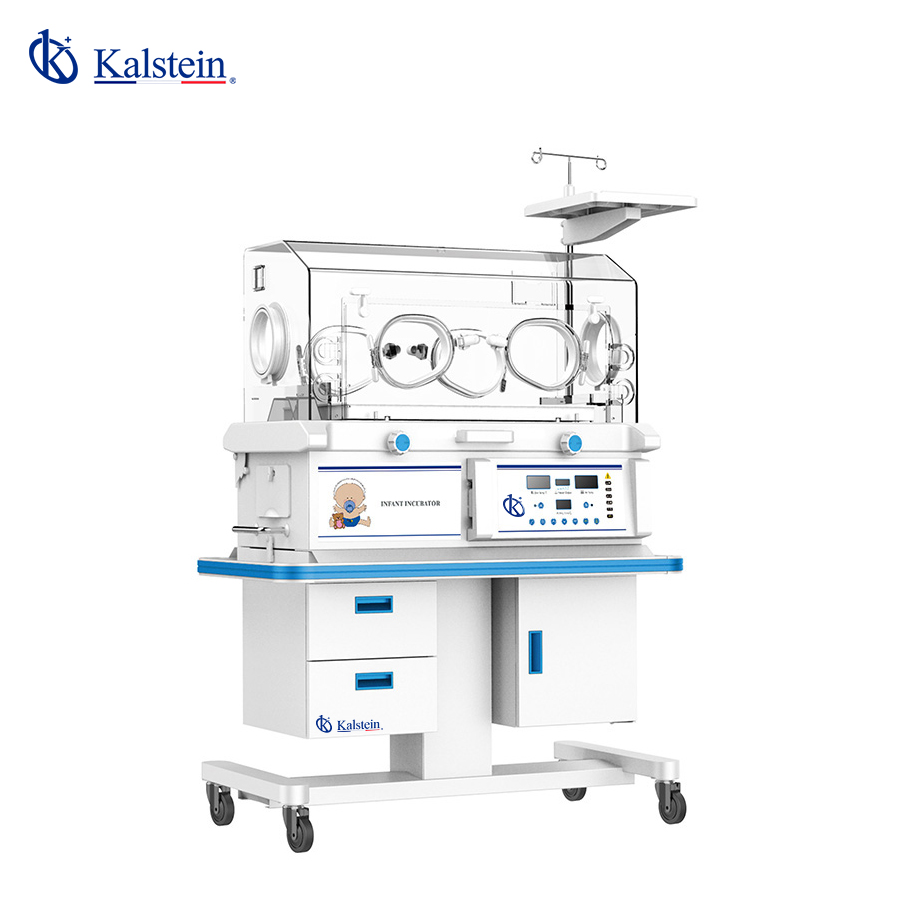
Installation and Commissioning Guide for the YR02185 Infant Incubator
The YR02185 Infant Incubator is designed to provide a stable environment for newborns, ensuring their safety and comfort. This guide will walk you through the essential steps for the installation and initial commissioning of the YR02185, highlighting specific procedures, setup advice, and troubleshooting techniques.
Overview of the YR02185 Infant Incubator
The YR02185 model features advanced microprocessor-controlled temperature regulation, ensuring precise and reliable thermal management for fragile infants. With its compact design and robust safety features, it is the ideal choice for hospitals and clinics, particularly in neonatal intensive care units (NICUs).
Technical Data of the YR02185
| Specification | Detail |
|---|---|
| Model | YR02185 |
| Temperature Control | Air temperature control: Yes, Skin temperature control: Optional |
| Heating Power | Adjustable for optimal infant care |
| Alarm System | Audible and visible alarms for multiple failures with three priority levels |
| Material | Aluminum structure for temperature stability |
| Dimensions | 108 x 64 x 92.7 cm |
| Weight | Gross weight: 120 kg |
| Optional Accessories | Adjustable mattress, humidity monitor, dual-wall hood, etc. |
Installation Checklist for the YR02185
Before installation, ensure that the following requirements are met:
- Verify that the location is free from vibrations and EMI (Electromagnetic Interference).
- Ensure adequate ventilation and access to power sources.
- Confirm that the incubator is level and stable before use.
- Check all available accessories and tools needed for setup.
Unboxing and Initial Setup
Upon receiving the YR02185, carefully unbox the unit as follows:
- Remove the incubator and accessories from the packaging.
- Inspect for any damage that may have occurred during shipping.
- Position the incubator in a suitable location away from direct sunlight and drafts.
- Level the incubator using adjustable feet if necessary.
Power-Up Sequence
To power up the YR02185, follow these steps:
- Connect the unit to a reliable power source.
- Press the power button and wait for the initialization process to complete.
- Configure the settings according to the requirements of the infant being treated.
Calibration and First Run
Calibration is crucial for the accuracy of the incubator. Follow these steps:
- Set the desired air temperature and verify with an external thermometer.
- Adjust heating levels based on the infant's requirements and room conditions.
- Run a test cycle to ensure proper temperature maintenance.
Troubleshooting Common Issues
In case of operational issues, refer to the table below for common symptoms and solutions.
| Symptom | Probable Cause | Solution |
|---|---|---|
| Equipment does not power on | Power supply issue | Check power connections and ensure the outlet is functional. |
| Error code E-03 | Temperature sensor failure | Inspect the sensor connections and replace if necessary. |
| Inconsistent readings | Improper calibration | Re-calibrate the incubator using an accurate thermometer. |
Frequently Asked Questions
How do I ensure the YR02185 operates at optimal performance?
To ensure optimal performance, regularly calibrate the incubator, check for blockages in air circulation, and maintain cleanliness throughout the usage period.
What are the recommended temperature settings for premature infants in the YR02185?
For premature infants, a stable air temperature of around 32°C to 34°C is recommended, adjusting as necessary based on individual needs and clinical protocols.
Can I customize the YR02185 with additional accessories?
Yes, the YR02185 can be customized with several optional accessories such as adjustable mattresses, humidity monitoring systems, and phototherapy units, enhancing its functionality.
What maintenance is required for the YR02185?
Routine maintenance includes checking the temperature sensors, cleaning the incubator surfaces, and ensuring proper function of alarms and other safety features.
How can I troubleshoot alarm issues on the YR02185?
If alarms sound, check the alarm type displayed on the screen. Verify temperature settings, inspect sensors, and correct any identified issues according to the troubleshooting table.
What is the expected lifespan of the YR02185?
The expected lifespan of the YR02185 is typically around 10 years with proper maintenance and servicing. Regular inspections are recommended to ensure ongoing performance.
Where can I request a quote for the YR02185?
You can request a quote for the YR02185 by contacting our sales department through our online platform.
If you are looking for a fusion of innovation and quality, you have come to the right place. At Kalstein, we offer you the luxury of exploring our exclusive catalog of laboratory equipment. We manufacture every device to the highest standards of excellence. Our intuitive and seamless online purchasing channels are designed for your convenience, securing the most competitive prices. Hesitate no longer — we bring science to life, it is time to become part of our community.