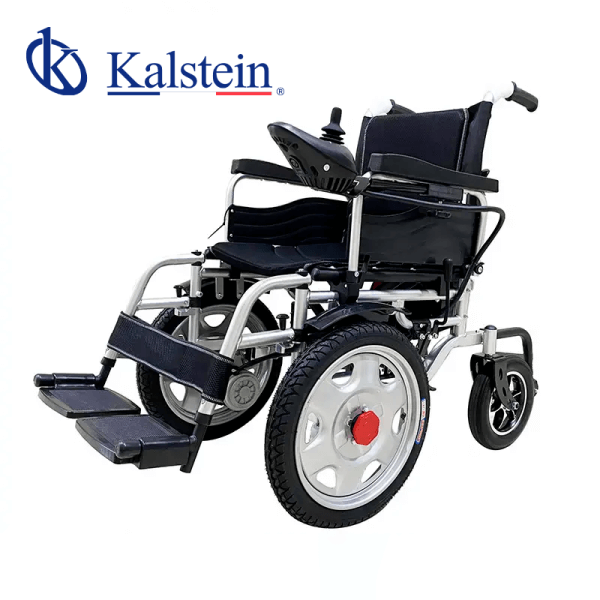
Installation and Setup Guide for the YR05439 Children Wheelchair
The YR05439 Children Wheelchair is designed for both comfort and accessibility. This guide aims to provide detailed instructions for installation and initial setup, ensuring that caregivers and users can efficiently operate this essential medical equipment.
Understanding the Features of the YR05439
The YR05439 is equipped with several features that enhance its usability:
- Lightweight Foldable Design: Easy to transport and travel.
- Manual Mode Switch: Allows for manual operation when needed.
- Detachable Footrests: Provide customizable seating adjustments.
- Rear Handle: Facilitates easy maneuvering.
- Folding Armrests: Enhance accessibility for entering and exiting the wheelchair.
Technical Specifications of the YR05439
| Specification | Details |
|---|---|
| Model | YR05439 |
| Seat Width | 45 cm |
| Seat Depth | 45 cm |
| Seat Height | 50 cm |
| Backrest Height | 39 cm |
| Total Length | 118 cm |
| Average Width | 63 cm |
| Total Height | 93 cm |
| Rear Wheel Size | 8 inches |
| Front Wheel Size | 16 inches |
| Folded Height | 74 cm |
| Folded Length | 72 cm |
| Folded Width | 38 cm |
| Net Weight | 43 kg / 48.5 kg |
| Frame Material | Steel |
| Load Capacity | 130 kg |
| Operating Range | 15 kilometers |
| Maximum Speed | 6 km/h |
| Motor | 250 W x 2 pieces |
| Battery | Lead acid 24V 12Ah |
| Hand Brake | Manual brake and electromagnetic brake |
| Cushion Color | Black |
Unboxing Checklist
Before installation, ensure that you have all necessary components:
- YR05439 Wheelchair
- User Manual
- Detachable Footrests
- Rear Handle Assembly
- Tools for Assembly (if required)
Initial Setup Steps for the YR05439
Following the unboxing checklist, proceed with the initial setup:
1. Assembling the Wheelchair
Attach the rear handle to the wheelchair frame securely. Ensure all screws are tightened to prevent any wobbling during use.
2. Attaching the Footrests
Secure the footrests in place. They should be easily detachable for added convenience.
3. Adjusting the Armrests
Fold down the armrests to allow for easier entry and exit for the user. Ensure they are locked in place when raised.
4. Power-Up Sequence
Verify that the battery is charged before starting the wheelchair. Turn on the power and check that all systems function appropriately.
5. Calibration and First Run
Conduct a short first-run test to ensure everything is functioning correctly. Test the brakes, steering, and propulsion systems.
Troubleshooting Common Installation Problems
If issues arise during the installation or initial setup, refer to the following troubleshooting guide:
| Symptom | Possible Cause | Solution |
|---|---|---|
| Wheelchair does not power on | Battery may be depleted | Charge the battery fully before attempting to power on again. |
| Brakes are not engaging | Incorrect assembly of brake system | Recheck the brake installation as per the user manual. |
| Unstable wheel alignment | Loose wheel fittings | Tighten wheel fittings and check alignment. |
| Poor maneuverability | Incorrectly inflated tires | Ensure the tires are inflated to the recommended pressure. |
Frequently Asked Questions
What are the maximum weight and height limits for the YR05439 Children Wheelchair?
The YR05439 can accommodate a maximum weight of 130 kg and is designed for children within the appropriate height range, considering seat height and dimensions.
How do I maintain the YR05439 to ensure longevity?
Regularly inspect the wheelchair for any loose screws or damages. Clean the wheels and frame, and ensure the battery is charged. Follow the user manual for detailed maintenance guidelines.
Can the YR05439 be used outdoors?
Yes, the YR05439 is designed for both indoor and outdoor use, but caution should be taken on uneven surfaces.
How do I change the battery in the YR05439?
To change the battery, first ensure the wheelchair is powered off. Locate the battery compartment, remove the old battery, and install the new one, ensuring proper connections.
Are there any accessories available for the YR05439?
Yes, optional accessories include additional footrests, cushions, and weather covers designed specifically for the YR05439.
What is the warranty period for the YR05439?
The YR05439 typically comes with a warranty period of one year from the date of purchase. Refer to the warranty documentation for more details.
How do I request a quote for the YR05439?
To request a quote, contact our customer service team through the appropriate channels to receive pricing and availability information.
If you are looking for a fusion of innovation and quality, you have come to the right place. At Kalstein, we offer you the luxury of exploring our exclusive catalog of laboratory equipment. We manufacture every device to the highest standards of excellence. Our intuitive and seamless online purchasing channels are designed for your convenience, securing the most competitive prices. Hesitate no longer — we bring science to life, it is time to become part of our community.