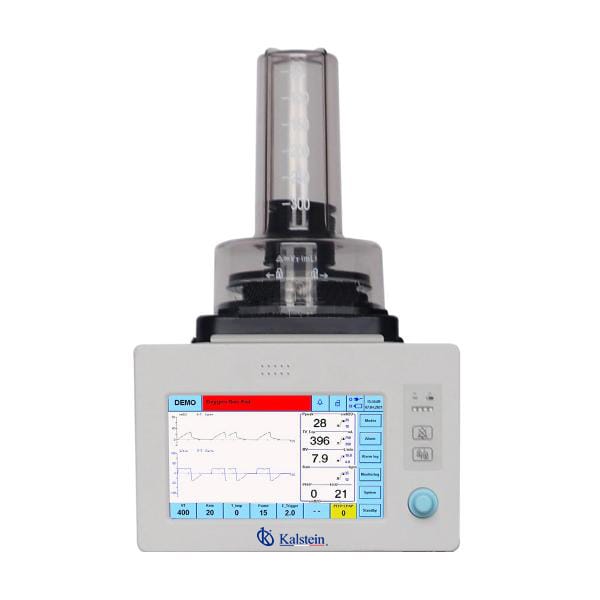
Installation and Setup Guide for the YR06103 Veterinary Anesthesia Ventilator
The YR06103 Veterinary Anesthesia Ventilator is designed to provide reliable and efficient anesthesia support for various veterinary applications. This guide focuses on the crucial steps for installation and initial setup, ensuring that operators can maximize the ventilator's functionality while ensuring safety and compliance.
Unboxing and Initial Inspection
Before proceeding with installation, it is essential to carefully unpack the YR06103 and inspect all components for any signs of damage. Follow these steps:
- Open the box and remove the items carefully.
- Verify that all components are present, including the ventilator, power cord, user manual, and any accessories.
- Inspect the equipment for physical damage and report any issues immediately.
Location and Environmental Considerations
Choosing the right location for the YR06103 is critical for its performance. Here are essential environmental considerations:
- Ensure the location is clean and free of dust.
- Maintain a stable temperature range between 15-30°C.
- Avoid direct sunlight and moisture exposure.
- Ensure adequate ventilation to prevent overheating.
Power and Connectivity Setup
Connecting the YR06103 to a power source and ensuring proper connectivity is vital for functionality. Follow these instructions:
- Connect the power cord to the ventilator and plug it into a suitable outlet.
- Ensure that the voltage matches the specifications (220V or as noted in the manual).
- If applicable, connect the ventilator to a gas supply source (O2 or Air) and check for leaks.
Calibration and First Run Testing
Before using the YR06103, calibration is necessary to ensure accurate measurements and settings. Perform the following steps:
- Turn on the ventilator and allow it to boot up.
- Access the calibration settings via the 9-inch TFT touch screen.
- Follow prompts to calibrate parameters such as tidal volume and respiratory rate.
- Run a test cycle to confirm functionality and accuracy.
Common Setup Mistakes and Troubleshooting
Even experienced users may encounter issues during setup. Here are common mistakes to avoid:
| Mistake | Probable Cause | Solution |
|---|---|---|
| Equipment does not power on | Loose power connection | Check and secure all connections. |
| Error code E-03 | Gas supply issue | Ensure gas is connected and check for leaks. |
| Inconsistent readings on screen | Calibration not performed | Recalibrate according to the manual instructions. |
Technical Specifications of YR06103
| Specification | Details |
|---|---|
| Model | YR06103 |
| Display | 9-inch TFT touch screen |
| Gas Type | O2 or Air |
| Inlet Pressure | 280-600 kPa |
| Max Flow | ≤ 120 L/min |
| Operating Modes | VCV, PCV, SPONT, Manual, Demo |
| Battery Type | Li-ion, work time more than 2 hours |
| Tidal Volume Range | 20 - 1500 mL |
| Weight | 12 kg |
| Dimensions | 38 x 30 x 50 cm |
Frequently Asked Questions
What are the key features of the YR06103 Veterinary Anesthesia Ventilator?
The YR06103 offers a compact design, lightweight for easy movement, automatic parameter calculations based on patient weight, and an HD TFT touch screen for user-friendly operation. It is equipped with battery backup for over two hours and is compatible with various anesthesia machines.
How do I ensure the YR06103 is calibrated correctly?
Calibration involves accessing the settings via the touch screen and following the prompts to adjust parameters like tidal volume and respiratory rate. It's important to perform a test cycle after calibration to confirm accurate functionality.
What should I do if the YR06103 displays an error code?
Error codes typically indicate specific issues such as gas supply problems or calibration errors. Refer to the user manual for detailed troubleshooting steps that correspond to each error code.
Can the YR06103 be used in different environments?
Yes, the YR06103 can be adapted for various settings, such as clinical, industrial, and educational applications, provided environmental conditions such as temperature and ventilation are maintained.
What is the maximum tidal volume that the YR06103 can provide?
The maximum tidal volume for the YR06103 is 1500 mL, making it suitable for a range of animal sizes.
How often should I perform maintenance on the YR06103?
Regular maintenance is crucial for optimal performance. It is recommended to perform checks and calibrations based on the frequency of use and manufacturer's guidelines, ensuring the device remains in peak condition.
Where can I find replacement parts for the YR06103?
Replacement parts and compatible accessories can be sourced from authorized dealers or directly through the manufacturer's channels. Always ensure you are purchasing genuine parts for compatibility and safety.
If you are looking for a fusion of innovation and quality, you have come to the right place. At Kalstein, we offer you the luxury of exploring our exclusive catalog of laboratory equipment. We manufacture every device to the highest standards of excellence. Our intuitive and seamless online purchasing channels are designed for your convenience, securing the most competitive prices. Hesitate no longer — we bring science to life, it is time to become part of our community.