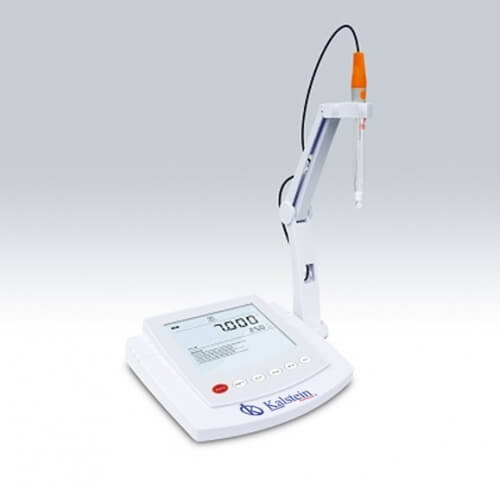
Installation and Startup Guide for the YR01823-2 pH Meter
The YR01823-2 pH Meter is a precision instrument crucial for accurate pH measurements in various laboratory settings. This guide will cover essential steps for its installation, startup, and first-time calibration, ensuring that you can utilize the device effectively and efficiently.
Unboxing the YR01823-2
When you receive your YR01823-2 pH Meter, it is essential to unbox it carefully to avoid damaging any components. Here are the steps involved:
- Open the package and remove the pH meter, ensuring that it is intact.
- Check for the following items included in the package:
- YR01823-2 pH Meter
- pH Electrode E201-BNC
- Temperature Probe TP-10K
- Buffer Solutions (pH 4.01, 7.00, 10.01)
- Power Adapter (DC 5V)
- USB Cable
- Inspect each component for any visible damage or defects.
Setting Up the YR01823-2 pH Meter
Proper setup of the YR01823-2 is crucial for its accurate operation. Follow these steps for optimal installation:
- Location: Place the pH meter on a stable, flat surface, away from direct sunlight or heat sources.
- Power Supply: Connect the power adapter to the meter and plug it into a power outlet to ensure proper voltage.
- Electrode Setup: Connect the pH electrode to the BNC connector on the pH meter.
- Temperature Probe: If necessary, connect the temperature probe to monitor temperature compensation.
Powering Up the YR01823-2
After ensuring all connections are secure, power up the pH meter:
- Press the power button located on the front panel of the YR01823-2.
- The large LCD display will illuminate, indicating that the device is ready for use.
Initial Calibration Procedure
Calibrating the YR01823-2 is essential for accurate measurements. The pH meter supports 1 to 5 point calibration:
- Prepare the standard buffer solutions (pH 4.01, 7.00, 10.01).
- Access the calibration menu by pressing the appropriate button on the device.
- Choose the number of calibration points you wish to perform (1 to 5).
- Immerse the pH electrode into the first buffer solution.
- Wait for the reading to stabilize, then confirm the calibration by following on-screen prompts.
- Repeat the process for additional buffer solutions as required.
Validation of First Measurement
Once calibrated, it is essential to validate the first measurement:
- Rinse the electrode with distilled water and immerse it in the sample solution.
- Wait for the reading to stabilize before recording the pH value displayed on the screen.
Common Setup Mistakes
Being aware of common mistakes can save you time and ensure accuracy:
- Neglecting to calibrate the meter before the first use.
- Using contaminated or expired buffer solutions during calibration.
- Failing to secure the connections for electrodes and probes properly.
Technical Specifications of the YR01823-2
| Model | YR01823-2 |
|---|---|
| pH Range | -2.000 to 20.000 pH |
| Resolution | 0.001, 0.01, 0.1 pH, selectable |
| Accuracy | ± 0.002 pH |
| Calibration Points | 1 to 5 points |
| Temperature Compensation | Automatic |
| Memory | Stores up to 500 data sets |
| Communication Interface | USB |
Frequently Asked Questions
What calibration options does the YR01823-2 support?
The YR01823-2 supports calibration from 1 to 5 points, allowing for a range of configurations based on user needs. It automatically recognizes standard buffer solutions including USA, NIST, and DIN buffers.
How do I perform a temperature compensation on the YR01823-2?
The YR01823-2 features automatic temperature compensation. During the calibration process, the meter adjusts the readings based on the temperature detected by the attached temperature probe.
What should I do if the YR01823-2 displays an error code?
If the YR01823-2 displays an error code, refer to the user manual for a list of codes and troubleshooting steps. Common solutions include checking the electrode connection and recalibrating the device.
How often should I calibrate the YR01823-2?
Calibration frequency depends on usage; however, it is recommended to calibrate the YR01823-2 regularly, especially when using it for critical measurements. A calibration reminder can be set for 1 to 31 days.
Can I connect the YR01823-2 to a computer?
Yes, the YR01823-2 features a USB interface for data transfer, allowing you to connect it to a computer for data logging and analysis.
What is the maximum operating temperature for the YR01823-2?
The maximum operating temperature for the YR01823-2 is 105 °C (221 °F). Ensure that the device is not exposed to temperatures exceeding this limit to prevent damage.
How can I request a quote for the YR01823-2?
You can request a quote for the YR01823-2 by visiting our dedicated product page and submitting your inquiry. Our sales team will assist you promptly.
If you are looking for a fusion of innovation and quality, you have come to the right place. At Kalstein, we offer you the luxury of exploring our exclusive catalog of laboratory equipment. We manufacture every device to the highest standards of excellence. Our intuitive and seamless online purchasing channels are designed for your convenience, securing the most competitive prices. Hesitate no longer — we bring science to life, it is time to become part of our community.