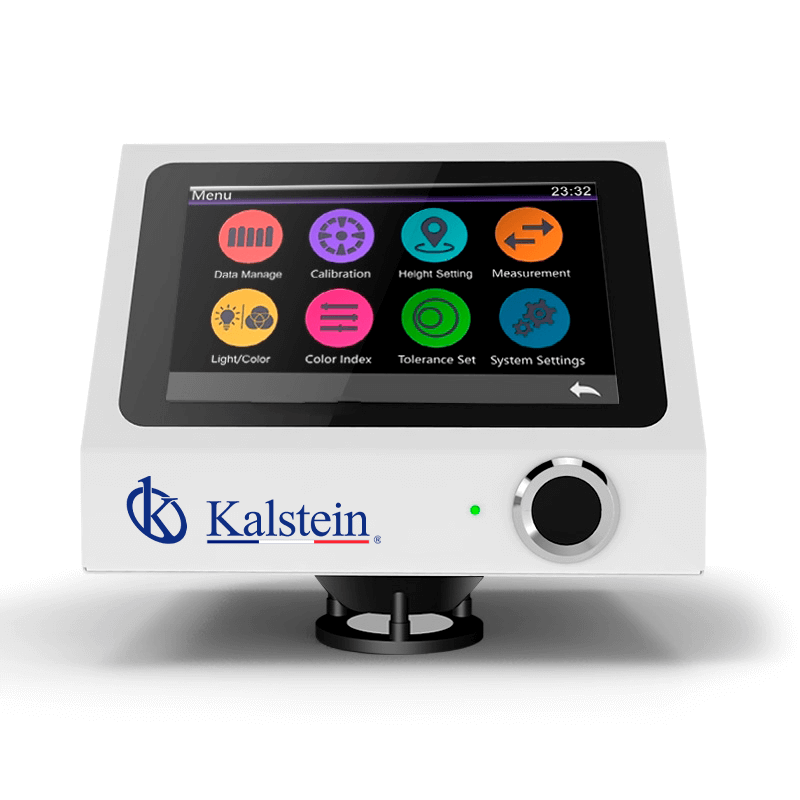
Installation and Startup Guide for the YR05480 Contactless Desktop Spectrophotometer
The YR05480 contactless desktop spectrophotometer is an advanced instrument designed for precise color measurement without physical contact with the sample. In this comprehensive guide, we will explore the essential steps for installation and startup, ensuring that you can achieve optimal performance from your YR05480 from the moment it arrives.
Unboxing Checklist
When you receive your YR05480, follow this unboxing checklist to ensure all components are present and in good condition:
- YR05480 Spectrophotometer
- Power adapter
- User manual
- Data cable
- Calibration plate
- Calibration black box
Site Requirements
Before installing the YR05480, it is crucial to ensure your site meets the necessary environmental conditions. Here’s a checklist for site preparation:
| Requirement | Specification |
|---|---|
| Operating Temperature | 0~40 °C |
| Humidity | 0~85 % RH (non-condensing) |
| Voltage | AC 24V |
| Altitude | Less than 2000 m |
| Clearances | Ensure sufficient workspace around the unit |
| Vibration | Stable surface recommended |
Setting Up the YR05480
Follow these steps to set up your spectrophotometer:
- Find a stable surface for the YR05480, ensuring it is level.
- Connect the power adapter to the device and plug it into a power outlet.
- Connect the data cable to the YR05480 and your computer, if required for data transfer.
- Ensure that you have a clear area around the device for operation and maintenance.
Power-Up Sequence
Once the device is physically set up, power it on using the following sequence:
- Press the power button located on the front of the YR05480.
- Wait for the initialization process to complete. The screen will display a welcome message once powered up.
- Verify that the calibration plate and black box are in place before proceeding to the calibration step.
First-Run Calibration
Calibration is essential for ensuring accurate measurements. Here’s how to calibrate the YR05480:
- Access the calibration menu on the device’s touchscreen.
- Select the calibration option and follow the on-screen instructions.
- Use the calibration plate to set the baseline measurements.
- After calibration, perform a test measurement to confirm accuracy.
Common Setup Mistakes
Here are some common mistakes to avoid during setup:
- Not leveling the device properly can lead to inaccurate measurements.
- Failure to calibrate before initial use can result in erroneous readings.
- Improper ambient conditions (temperature/humidity) can affect performance.
Technical Specifications of YR05480
| Parameter | Details |
|---|---|
| Model | YR05480 |
| Geometric Configuration | D/8 (diffuse illumination, 8° reception, SCI includes specular reflection light) |
| Light Source | Full spectrum LED, UV light source |
| Measurement Accuracy | Contactless testing for liquids, sauces, powders, etc. |
| Measurement Time | As fast as 0.2 seconds |
| Dimensions | 200 x 200 x 160 mm |
| Weight | Approximately 3 kg |
| Data Storage Capacity | 18,000 samples in sample mode |
Frequently Asked Questions
What types of samples can the YR05480 analyze effectively?
The YR05480 can effectively analyze various types of samples including liquids, sauces, and powders, utilizing its advanced contactless measurement technology to ensure accuracy without direct contact.
How often should the YR05480 be calibrated?
It is recommended to calibrate the YR05480 before each use, especially if the device has been moved or if the environmental conditions have changed significantly.
What maintenance is required for the YR05480?
Regular maintenance includes cleaning the sensor areas, checking for software updates, and ensuring that the calibration plate is free from debris to maintain measurement accuracy.
Can the YR05480 connect to other devices for data transfer?
Yes, the YR05480 features Bluetooth 5.0 connectivity which allows for stable and reliable data transfer to compatible devices for data analysis and reporting.
What environment is best suited for operating the YR05480?
The ideal operating environment for the YR05480 is between 0~40 °C with humidity levels not exceeding 85% RH, ensuring that no condensation occurs, which could affect the device's performance.
What are the key features of the YR05480?
Key features of the YR05480 include contactless measurement technology, full spectrum LED light source, a high-resolution CMOS image sensor, and customizable software functionalities for varied applications.
How can I request a quote for the YR05480?
You can easily request a quote by visiting our contact section, where you can fill out a request form specific to your needs for the YR05480.
If you are looking for a fusion of innovation and quality, you have come to the right place. At Kalstein, we offer you the luxury of exploring our exclusive catalog of laboratory equipment. We manufacture every device to the highest standards of excellence. Our intuitive and seamless online purchasing channels are designed for your convenience, securing the most competitive prices. Hesitate no longer — we bring science to life, it is time to become part of our community.