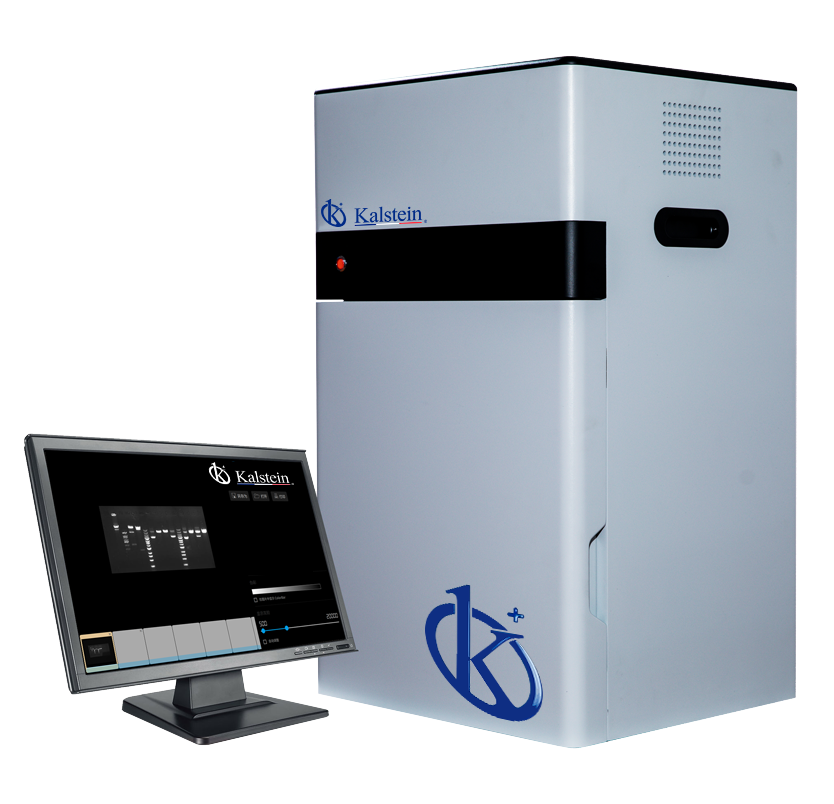
Installation and Startup Guide for the YR06063 Gel Documentation System
The YR06063 Gel Documentation System is an advanced tool designed for high-resolution imaging in laboratory settings. This guide will walk you through the essential steps for installation and startup, ensuring that you can leverage the full potential of this sophisticated equipment.
Unboxing and Initial Setup
When you receive the YR06063, careful unboxing is crucial to prevent damage. Below is an unboxing checklist to ensure all components are accounted for:
- YR06063 Gel Documentation System Unit
- Power Cable
- Data Cable (USB or Network)
- Lens Cover
- Instruction Manual
- Calibration Tool
Installation Procedure
Follow these steps to install the YR06063:
- Location Selection: Choose a stable and clean surface that is free from vibration. Ensure there is adequate clearance around the device for ventilation.
- Levelling: Use a spirit level to ensure the unit is correctly leveled. Adjust the feet of the unit as necessary.
- Power Connection: Connect the power cable to an appropriate power source. Ensure the voltage matches the specifications indicated in the manual.
- Data Connection: Connect the data cable (USB or Network) to your computer or local network, depending on your setup choice.
Power-Up Sequence and First Run Calibration
Once physically set up, follow this power-up sequence:
- Turn on the power switch located at the back of the unit.
- Wait for the system to boot up; the LED indicators will show operational status.
- Launch the software installed on your connected computer.
- Follow on-screen instructions to perform the first run calibration:
- Insert the calibration tool as guided.
- Allow the system to complete the calibration process.
- Verify the calibration results and adjust settings if necessary.
Common Setup Mistakes and Troubleshooting
During the installation and startup of the YR06063, you may encounter some common mistakes. Below are solutions to potential issues:
| Mistake | Symptoms | Solution |
|---|---|---|
| Improper cabling | Device does not power on | Check all cable connections and ensure they are secure. |
| Uncalibrated unit | Inconsistent imaging results | Re-run the calibration procedure outlined in the software. |
| Insufficient ventilation | Overheating during operation | Ensure the unit is placed in a well-ventilated area with space around it. |
Technical Specifications of the YR06063
| Specification | Details |
|---|---|
| Model | YR06063 |
| Camera Type | Scientific digital monochrome camera |
| Resolution | 5 megapixels, 2592*1944 |
| A/D, Pixel Density | 16 bits |
| Gray Scales | 65536 |
| Lens | Motorized lens, no manual focusing required |
| Sensitivity | ≤10pg DNA samples stained with EtBr |
| UV Transmission | Wavelength 302nm, Area: 21x26cm |
| White LED Transmission | True LED transmission plate, Area 19x26cm |
| Filter | Standard gel documentation filter |
| Image Acquisition Software | No dongle required, free updates, unlimited users |
| Image Analysis Software | No dongle required, free updates, unlimited users |
Frequently Asked Questions
What are the key features of the YR06063 Gel Documentation System?
The YR06063 features high-resolution imaging of up to 20 megapixels, a motorized lens that eliminates the need for manual focusing, and a true white LED transmission plate for optimal image clarity.
How do I troubleshoot when the YR06063 does not power on?
Check all power connections, ensuring the unit is plugged into a functioning outlet. If the problem persists, inspect the power cable for any signs of damage.
What is the recommended calibration procedure for the YR06063?
After installation, use the supplied calibration tool to follow the on-screen instructions within the software. This ensures accurate imaging results and optimal performance.
Can the YR06063 be connected to multiple users?
Yes, the software for image acquisition and analysis allows for unlimited users, making it suitable for collaborative environments.
What types of samples can be effectively documented using the YR06063?
The YR06063 is ideal for documenting DNA samples stained with Ethidium Bromide and other gel-based assays, providing high sensitivity and image quality.
What kind of maintenance does the YR06063 require?
Regular cleaning of the lens and calibration checks are recommended to maintain optimal performance. Additionally, software updates should be checked periodically for new features and improvements.
How do I request a quote for the YR06063?
You can easily request a quote by contacting our sales team through our official channels.
If you are looking for a fusion of innovation and quality, you have come to the right place. At Kalstein, we offer you the luxury of exploring our exclusive catalog of laboratory equipment. We manufacture every device to the highest standards of excellence. Our intuitive and seamless online purchasing channels are designed for your convenience, securing the most competitive prices. Hesitate no longer — we bring science to life, it is time to become part of our community.