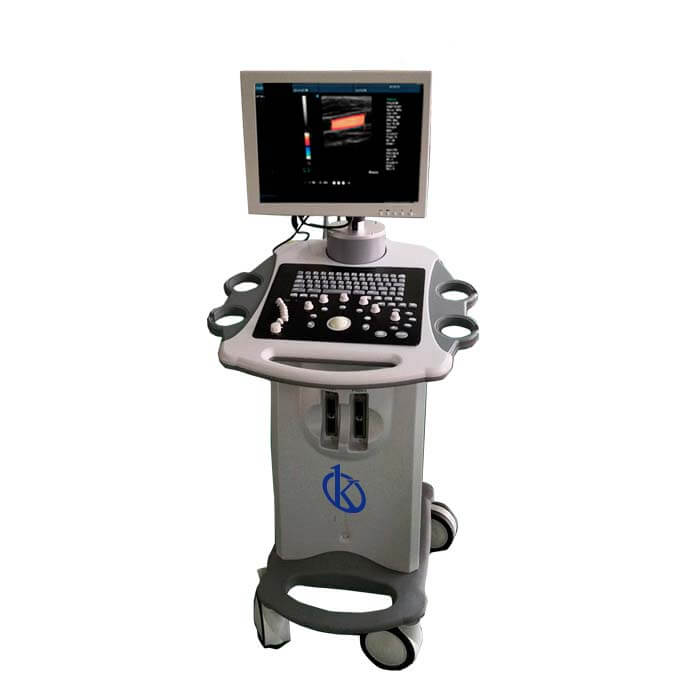
Troubleshooting Common Errors on the YR05155: A Comprehensive Guide
The YR05155 is a sophisticated ultrasound device utilized across various medical and industrial fields. Despite its advanced technology, users may occasionally encounter errors or unexpected performance issues. This guide addresses common symptoms associated with the YR05155, including probable causes, diagnostic steps, and effective solutions.
Understanding the YR05155
The YR05155 ultrasound scanner provides essential imaging capabilities for diagnostics. Its linear probe offers detailed images, making it invaluable in clinical and research settings. Understanding the basic functionalities of the YR05155 is crucial for effective troubleshooting.
Technical Specifications of YR05155
| Model | Brand | Category | Subcategory | Price (USD) | Gross Weight (kg) | Package Dimensions (cm) |
|---|---|---|---|---|---|---|
| YR05155 | Kalstein | Ultrasound Scanner | Ultrasonic Diagnostic Equipment | 950.00 | 2.5 | 18 x 24 x 9 |
Troubleshooting by Symptom
Equipment Does Not Power On
If the YR05155 fails to power on, potential causes include a faulty power supply, disconnected cables, or internal component failure. Begin by checking the power source and connections. If the issue persists, consider contacting technical support.
Error Code E-03
Error code E-03 often indicates a malfunction within the probe connection. Ensure that the probe is securely attached. If the error continues to occur, inspect the probe for physical damage or consider replacing it.
Inconsistent Readings
Inconsistent readings may arise from improper calibration, environmental interference, or probe malfunctions. Recalibrate the device according to the manufacturer's instructions and ensure that the probe is functioning correctly.
Symptom-Cause-Solution Table
| Symptom | Probable Cause | Solution |
|---|---|---|
| Equipment Does Not Power On | Faulty power supply | Check power source and connections |
| Error Code E-03 | Probe connection issue | Secure probe attachment; replace if damaged |
| Inconsistent Readings | Calibration or probe issue | Recalibrate and check probe functionality |
Common Setup Mistakes
Many operational errors stem from mistakes made during the initial setup of the YR05155. Common issues include incorrect probe connection, inadequate environmental conditions, and failure to follow startup sequences. Ensuring proper setup can prevent many troubleshooting scenarios.
Best Practices for Maintenance
Regular maintenance of the YR05155 can significantly reduce errors. This includes routine calibration, cleaning of the probe, and software updates. Keeping a log of maintenance activities can help track the performance and longevity of the device.
Frequently Asked Questions
What should I do if my YR05155 keeps displaying error code E-03?
Error code E-03 usually means there is an issue with the probe connection. Make sure the probe is correctly connected to the device. If the problem persists, check for any physical damage on the probe and consider replacing it.
How can I ensure accurate readings from my YR05155 ultrasound device?
To achieve accurate readings, ensure proper calibration of the device according to the user manual. Regular maintenance and using the device within specified environmental conditions are also crucial for maintaining accuracy.
What are the common symptoms of malfunctioning ultrasound equipment?
Common symptoms include power failures, error codes, and persistent inconsistent readings. Users should be familiar with these symptoms to troubleshoot effectively.
How often should I calibrate my YR05155 ultrasound scanner?
Calibration should be performed regularly, depending on usage frequency. It is recommended to check the calibration every few months or before critical diagnostic procedures.
Can environmental factors affect the performance of the YR05155?
Yes, environmental factors such as temperature, humidity, and electromagnetic interference can impact the performance of the YR05155. It is essential to maintain optimal conditions during operation.
What maintenance practices can extend the lifespan of the YR05155?
Regular cleaning, calibration, software updates, and following the manufacturer’s guidelines are effective practices to extend the lifespan of the YR05155.
Where can I find replacement parts for the YR05155?
Replacement parts can typically be found through authorized dealers or the manufacturer. Consult the user manual for specific part numbers and ordering information.
If you are looking for a fusion of innovation and quality, you have come to the right place. At Kalstein, we offer you the luxury of exploring our exclusive catalog of laboratory equipment. We manufacture every device to the highest standards of excellence. Our intuitive and seamless online purchasing channels are designed for your convenience, securing the most competitive prices. Hesitate no longer — we bring science to life, it is time to become part of our community.