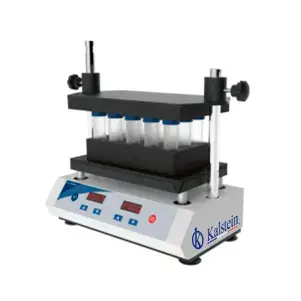
Troubleshooting Common Errors in the YR06046 Vortex Mixer: A Comprehensive Guide
The YR06046 Vortex Mixer is a versatile tool used in numerous applications, from clinical laboratories to tattoo studios. However, like any piece of equipment, it may encounter issues that require troubleshooting. This guide delves into frequent symptoms, probable causes, and concrete solutions to ensure optimal performance.
Understanding Common Symptoms in the YR06046 Vortex Mixer
Before diving into troubleshooting, it’s essential to know typical symptoms that indicate there may be a problem with your YR06046 Vortex Mixer. Here are some common issues users might encounter:
- Equipment does not power on
- Error code display
- Inconsistent mixing results
- Excessive noise during operation
- Overheating of the unit
Technical Specifications of the YR06046 Vortex Mixer
| Model | Brand | Category | Price (USD) |
|---|---|---|---|
| YR06046 | Kalstein | Vortex Mixer | 180.00 |
| Motor Type | Speed Range | Power | Protection Class |
| Brushless Motor | 0-3000 rpm | 20W | IP21 |
| Capacity | Operating Temperature | Voltage | Dimension |
| 50ml*4 / 15ml*9 / 5-10ml*12 / 2ml*24 | 5 - 40℃ | AC 100-240V / DC24V | 27.5 x 20 x 13.5 |
Troubleshooting Symptoms and Solutions
When encountering an issue with the YR06046 Vortex Mixer, it’s crucial to identify the symptom accurately to implement the correct solution. Below is a symptom-to-solution matrix to guide you through common problems:
| Symptom | Possible Cause | Solution |
|---|---|---|
| Equipment does not power on | Power source issue | Check power connection and outlet |
| Equipment does not power on | Internal fuse blown | Replace the blown fuse |
| Error code display | Calibration error | Reset the mixer and recalibrate |
| Inconsistent mixing results | Unstable speed setting | Adjust the speed knob appropriately |
| Excessive noise during operation | Loose components | Tighten or replace any loose parts |
| Overheating of the unit | Continuous operation beyond recommended time | Allow the unit to cool down and limit use duration |
Detailed Troubleshooting Steps by Symptom
Equipment Does Not Power On
If your YR06046 Vortex Mixer fails to power on, follow these steps:
- Verify that the power cord is securely connected to both the mixer and the power outlet.
- Check for any visible damage to the power cord.
- Inspect the outlet by plugging in another device to ensure it is functioning.
- If still unresponsive, consider replacing the internal fuse as per your user manual instructions.
Error Code Display
When your mixer displays an error code, you'll need to diagnose the problem:
- Refer to the user manual for the specific error code meanings.
- Power cycle the unit by unplugging and replugging it.
- Follow any calibration steps outlined in the manual; this may involve adjusting settings or resetting the device.
Inconsistent Mixing Results
Inconsistent results can often stem from user settings:
- Ensure the correct speed setting is selected for your application.
- Inspect the mixing container for proper size and loading as per the specifications.
- Adjust the speed knob to find the optimal speed for the materials being mixed.
Excessive Noise During Operation
Unusual noises can indicate mechanical problems:
- Inspect all external components for loose screws or attachments.
- Check for any obstructions around the mixing area that could cause contact sounds.
- Consult the maintenance section of the manual for lubrication and care instructions.
Overheating of the Unit
If your YR06046 is overheating, consider the following:
- Allow the unit to rest and cool down before next use.
- Ensure you’re not exceeding recommended operational times as listed in your user manual.
- Evaluate the environment for excessive heat or lack of ventilation.
Frequently Asked Questions
What are the common error codes displayed by the YR06046?
Common error codes may include calibration errors, speed setting issues, or overheating warnings. Refer to the user manual for specific code meanings and troubleshooting guidelines.
How can I adjust the speed settings on the YR06046?
The YR06046 features a speed adjustment knob. Rotating this knob allows you to select the desired speed between 0-3000 rpm, which is essential for various mixing applications.
What maintenance is required for the YR06046 Vortex Mixer?
Regular maintenance includes cleaning the exterior, checking for loose parts, and ensuring the motor and internal components are functioning correctly. Periodic lubrication may also be required as per the user guide.
Can I use the YR06046 for mixing thicker substances?
Yes, the YR06046 can mix thicker substances, but it is crucial to monitor the speed settings and container types to prevent strain on the motor.
What is the warranty period for the YR06046?
The warranty period typically spans one year from the purchase date, covering defects in materials and workmanship under normal use conditions. Always check with the supplier for specific terms.
Where can I find replacement parts for the YR06046?
Replacement parts can be sourced from authorized dealers or directly from the manufacturer's catalog. It's advisable to use genuine parts to maintain optimal performance.
How do I reset the YR06046 after an error occurrence?
To reset the YR06046, unplug the unit for a few minutes, then plug it back in. Follow the calibration procedures outlined in the user manual if necessary.
If you are looking for a fusion of innovation and quality, you have come to the right place. At Kalstein, we offer you the luxury of exploring our exclusive catalog of laboratory equipment. We manufacture every device to the highest standards of excellence. Our intuitive and seamless online purchasing channels are designed for your convenience, securing the most competitive prices. Hesitate no longer — we bring science to life, it is time to become part of our community.