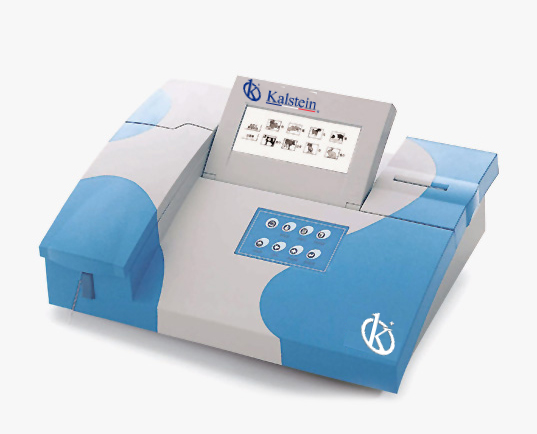
Troubleshooting Common Errors in the YR06077 Veterinary Analyzer
The YR06077 Veterinary Analyzer is a sophisticated instrument designed to facilitate accurate and efficient diagnostic testing across various animal species. However, like any advanced technology, it may encounter operational issues or error codes that can hinder its performance. Understanding these common errors and their troubleshooting solutions is crucial for ensuring reliable operation in clinical settings.
Understanding the YR06077: Overview and Key Features
The YR06077 Veterinary Analyzer supports testing for up to 12 types of animals, including 8 fixed types and 4 open types. Its bicromatic optical system operates at 7 different wavelengths, enabling it to perform 34 fixed common tests along with an additional 20 user-defined tests. Its advanced features, such as real-time reaction curve visualization and automated sleep lamp, enhance its operational efficiency.
Technical Specifications of the YR06077
| Specification | Details |
|---|---|
| Model | YR06077 |
| Principle | Absorbance |
| Photometric Range | -0.500-3.500 Abs |
| Resolution | 0.001 Abs (displayed), 0.0001 Abs (calculated) |
| Light Source | Halogen Lamp |
| Wavelengths | 340, 405, 500, 546, 578, 620, 670 nm, 1 optional filter |
| Wavelength Accuracy | ±2 nm |
| Memory | 200 test parameters, up to 3000 sample results |
| Dimensions (L * W * H) | 460 * 330 * 190 mm |
| Power Supply | AC 110V/220V, 50Hz/60Hz |
Common Symptoms and Troubleshooting Solutions
Understanding the symptoms that may arise while using the YR06077 Veterinary Analyzer is essential for efficient troubleshooting. Below are some common error symptoms along with their probable causes and solutions.
1. Equipment Does Not Power On
This issue can occur due to several reasons, including power supply problems or internal faults. Here’s how to troubleshoot:
- Check the power cable and plug, ensuring they are securely connected and undamaged.
- Inspect the power outlet using another device to confirm functionality.
- If the power supply is functioning, internal fuse checks may be required.
2. Error Code E-03
The E-03 error code generally indicates a malfunction in the hardware components. To address this issue:
- Restart the analyzer and check if the error persists.
- Ensure that no foreign objects are obstructing the internal components.
- If the error continues, contact technical support for further assistance.
3. Inconsistent Readings
Inconsistent readings can lead to misdiagnosis. To resolve this issue:
- Verify that all reagents used are within their expiry dates and stored properly.
- Calibrate the device regularly, following the manufacturer’s guidelines.
- Ensure proper maintenance of the optical components, cleaning when necessary.
Symptom-Cause-Solution Matrix
| Symptom | Probable Cause | Solution |
|---|---|---|
| Equipment Does Not Power On | Power supply failure or internal fault | Check cables and outlets, inspect internal fuses |
| Error Code E-03 | Hardware malfunction | Restart device, check for obstructions, contact support |
| Inconsistent Readings | Expired reagents or poor calibration | Verify reagents, recalibrate device, clean optical components |
Best Practices for Preventing Errors
To minimize the occurrence of errors in the YR06077 Veterinary Analyzer, consider the following best practices:
- Conduct regular maintenance checks, including cleaning and calibration.
- Train personnel thoroughly on the operation and troubleshooting of the device.
- Keep an inventory of essential spare parts and consumables for quick replacements.
Frequently Asked Questions
What should I do if my YR06077 shows an error code?
If your YR06077 displays an error code, refer to the user manual for specific troubleshooting steps. Common errors can often be resolved by restarting the device or checking connections.
How do I calibrate the YR06077 Veterinary Analyzer?
Calibration involves using standard solutions to ensure the analyzer provides accurate results. Follow the calibration procedure outlined in the user manual for precise steps.
What types of animals can the YR06077 analyze?
The YR06077 can support testing for up to 12 types of animals, including both fixed and open types, making it versatile for various veterinary applications.
How often should I perform maintenance on the YR06077?
Regular maintenance is recommended at least every three months, or more frequently based on usage levels, to ensure continued accuracy and performance.
Can I customize the tests on the YR06077?
Yes, the YR06077 allows for user-defined tests, enabling customization based on specific veterinary diagnostic needs.
Where can I find support for the YR06077?
Support for the YR06077 can be found through the manufacturer's technical assistance team, which can provide guidance on troubleshooting and repairs.
If you are looking for a fusion of innovation and quality, you have come to the right place. At Kalstein, we offer you the luxury of exploring our exclusive catalog of laboratory equipment. We manufacture every device to the highest standards of excellence. Our intuitive and seamless online purchasing channels are designed for your convenience, securing the most competitive prices. Hesitate no longer — we bring science to life, it is time to become part of our community.