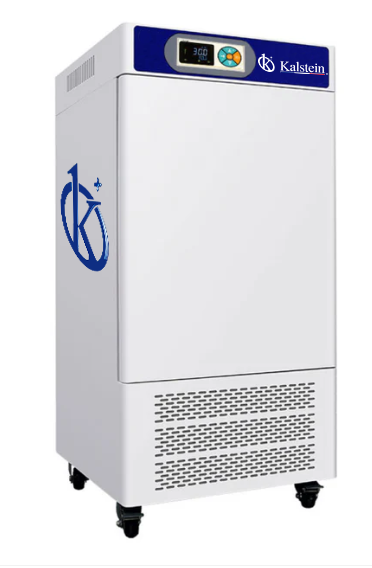
Troubleshooting Common Errors with the YR05806 Humidity Chamber
The YR05806 Humidity Chamber is a versatile and reliable tool used in various applications, including environmental testing and biological analysis. However, like all laboratory equipment, it can encounter issues over time. This article delves into common error codes associated with the YR05806, their probable causes, and effective troubleshooting steps to ensure uninterrupted operation.
Understanding the YR05806 Humidity Chamber
The YR05806 Humidity Chamber is designed to provide precise control of temperature and humidity, supporting various applications in research and development. Its robust construction and advanced features make it suitable for testing, storage, and analysis in various sectors, including pharmaceuticals, agriculture, and environmental science.
Technical Specifications of the YR05806
| Specification | Details |
|---|---|
| Model | YR05806 |
| Temperature Range (°C) | 0~60 |
| Precision (°C) | ±0.5 |
| Voltage (V) | 220 |
| Power (kW) | 0.6 |
| Inside Dimensions (mm) | 800×500×380 |
| Overall Dimensions (mm) | 1350×640×660 |
| Net Weight (kg) | 110 |
Common Error Codes and Troubleshooting Steps
When operating the YR05806, users may encounter specific error codes. Below are common errors, their probable causes, and solutions to resolve them effectively.
Error Code E-01: Temperature Sensor Malfunction
This error indicates a failure in the temperature sensor, which may lead to inaccurate readings.
- Probable Causes: Faulty sensor wiring, damaged sensor, or malfunctioning control board.
- Troubleshooting Steps:
- Check sensor connections and wiring for any visible damage.
- Inspect the temperature sensor for physical defects.
- Replace the sensor if necessary.
Error Code E-02: Humidity Sensor Malfunction
This error signifies that the humidity sensor is not functioning correctly, impacting the chamber's performance.
- Probable Causes: Sensor calibration issues, physical damage, or wiring faults.
- Troubleshooting Steps:
- Calibrate the humidity sensor as per manufacturer guidelines.
- Inspect for any physical damage or corrosion on connections.
- Replace the humidity sensor if required.
Error Code E-03: Over Temperature Alarm
This error indicates that the temperature inside the chamber has exceeded the set limit.
- Probable Causes: Faulty temperature control system, blocked ventilation, or incorrect settings.
- Troubleshooting Steps:
- Verify the set temperature and adjust it if needed.
- Check for any obstructions in the ventilation system.
- Inspect the control board for faults and replace if necessary.
Symptom-Cause-Solution Matrix
| Symptom | Probable Cause | Solution |
|---|---|---|
| Error Code E-01 | Faulty temperature sensor | Check and replace sensor if needed |
| Error Code E-02 | Humidity sensor malfunction | Calibrate or replace humidity sensor |
| Error Code E-03 | Overheating conditions | Check ventilation and adjust settings |
| Inconsistent readings | Calibration issues | Recalibrate the device |
Best Practices for Maintaining the YR05806 Humidity Chamber
Proper maintenance is essential for the longevity and performance of the YR05806. Follow these best practices:
- Regularly calibrate sensors to ensure accuracy.
- Keep the chamber clean and free of debris.
- Check and replace filters as needed to maintain airflow.
- Inspect electrical connections periodically to avoid failures.
Frequently Asked Questions
What should I do if my YR05806 does not power on?
If your YR05806 does not power on, check the power supply connection and ensure that the outlet is functioning. Inspect the power cord for any signs of damage or wear. If the issue persists, consult a technician.
How can I calibrate the temperature sensor of the YR05806?
To calibrate the temperature sensor, access the calibration menu on the control panel. Follow the manufacturer’s instructions provided in the user manual to ensure accurate adjustments.
What are the common applications for the YR05806 Humidity Chamber?
The YR05806 is used in various applications, including pharmaceutical testing, environmental studies, and biological research, where precise temperature and humidity control is crucial.
How often should I conduct maintenance on the YR05806?
Regular maintenance checks should be conducted monthly, with detailed inspections and calibrations performed quarterly to ensure optimal performance.
Can I replace the sensors in the YR05806 myself?
Yes, users can replace the sensors themselves, provided they follow the safety guidelines and instructions outlined in the user manual. However, if unsure, it is advisable to consult a professional.
What is the warranty period for the YR05806?
The YR05806 typically comes with a one-year warranty covering parts and labor. Check the warranty documentation for specific terms and conditions.
For more information on purchasing the YR05806 or to request a quote, please reach out to our team today.
If you are looking for a fusion of innovation and quality, you have come to the right place. At Kalstein, we offer you the luxury of exploring our exclusive catalog of laboratory equipment. We manufacture every device to the highest standards of excellence. Our intuitive and seamless online purchasing channels are designed for your convenience, securing the most competitive prices. Hesitate no longer — we bring science to life, it is time to become part of our community.