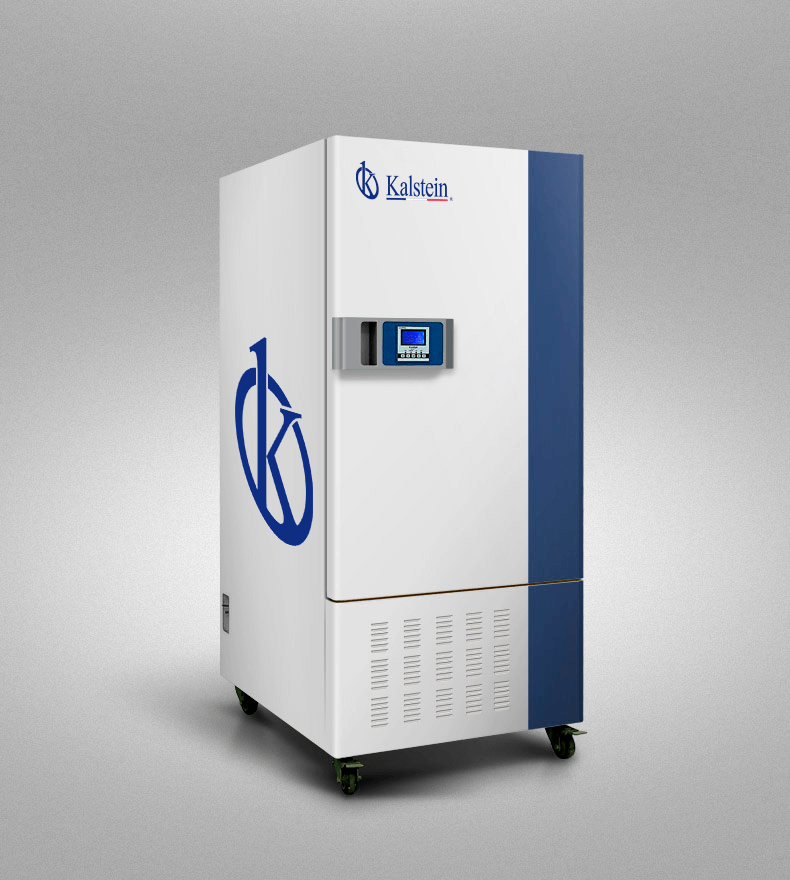
Troubleshooting Common Errors in the YR05337 Constant Weather Camera: A Comprehensive Guide
The YR05337 Constant Weather Camera is designed to meet rigorous laboratory standards, providing reliable monitoring of temperature and humidity. However, like any sophisticated device, it may encounter issues that affect its performance. This guide will explore common errors associated with the YR05337, detailing symptoms, probable causes, and effective solutions to ensure optimal functionality.
Understanding the YR05337 Constant Weather Camera
The YR05337 is a state-of-the-art constant weather camera that operates with advanced technology to maintain stable temperature and humidity levels. Its features include:
- High-efficiency insulation technology for consistent internal and external conditions.
- Adaptive temperature control and an original imported temperature sensor to reduce temperature fluctuations.
- Multiple safety certifications, including CE certification, ensuring high safety standards.
Technical Specifications of the YR05337
| Parameter | Specification |
|---|---|
| Model | YR05337 |
| Category | Climatic Chamber |
| Temperature Range (°C) | 0 to 60 |
| Humidity Range (%) | 40 to 95 |
| Power Supply | AC220V/50Hz |
| Dimensions (mm) | 1410 x 650 x 680 |
| Weight (kg) | 133 |
Common Symptoms and Troubleshooting Steps
Understanding the common symptoms that may arise with the YR05337 is crucial for effective troubleshooting. Below is a detailed examination of typical problems and their solutions.
Equipment Does Not Power On
If the YR05337 fails to power on, it can be attributed to several factors. Here are the probable causes and their solutions:
- Power Connection Issues: Ensure the power cable is securely connected to both the camera and the power outlet. Check for any visible damage to the cable.
- Power Supply Failure: Test the power outlet with another device. If the outlet is faulty, replace or repair it.
- Internal Fuse Blown: Inspect the internal fuse and replace it if necessary. Refer to the user manual for specific instructions.
Error Code E-03
Error code E-03 indicates a temperature sensor malfunction. To resolve this issue, follow these steps:
- Check Sensor Connections: Verify that the temperature sensor is properly connected. Loose connections can cause erroneous readings.
- Replace the Sensor: If the connections are secure but the error persists, consider replacing the temperature sensor.
Inconsistent Readings
Inconsistent temperature or humidity readings can lead to unreliable data. Here are steps to troubleshoot this issue:
- Calibrate the Device: Perform a calibration check to ensure that the readings are accurate. Refer to the calibration instructions in the manual.
- Check for Air Leaks: Inspect the chamber for any air leaks that could affect the stability of the environment inside.
Symptom-Cause-Solution Matrix for YR05337
| Symptom | Probable Cause | Solution |
|---|---|---|
| Equipment Does Not Power On | Power connection issues | Check power cable and outlet |
| Error Code E-03 | Temperature sensor malfunction | Check connections; replace sensor |
| Inconsistent Readings | Calibration issues or air leaks | Calibrate and inspect for leaks |
Frequently Asked Questions
What should I do if my YR05337 displays an error code that I cannot find in the manual?
If your YR05337 displays an error code not listed in the manual, consult the manufacturer’s support team for assistance. They can provide guidance specific to your model.
How can I ensure that my YR05337 operates efficiently?
Regularly calibrate the device, perform routine maintenance, and keep the external environment within specified limits to ensure efficient operation.
Can I perform repairs on the YR05337 myself?
While some minor repairs may be possible, it is highly recommended to contact a qualified technician for significant repairs to avoid any potential damage.
What accessories are compatible with the YR05337?
The YR05337 is compatible with various temperature and humidity sensors, as well as optional humidity control systems. Refer to the manufacturer’s catalog for specific accessory recommendations.
How often should I perform maintenance on the YR05337?
Maintenance should ideally be performed every six months, including a thorough cleaning and calibration checks to ensure accurate readings.
What are the typical symptoms of a failing sensor in the YR05337?
Typical symptoms include erratic readings, delayed response to changes in temperature or humidity, and error codes related to sensor failure.
Where can I request a quote for the YR05337?
You can request a quote for the YR05337 by contacting our sales department. We will provide you with all necessary information.
If you are looking for a fusion of innovation and quality, you have come to the right place. At Kalstein, we offer you the luxury of exploring our exclusive catalog of laboratory equipment. We manufacture every device to the highest standards of excellence. Our intuitive and seamless online purchasing channels are designed for your convenience, securing the most competitive prices. Hesitate no longer — we bring science to life, it is time to become part of our community.