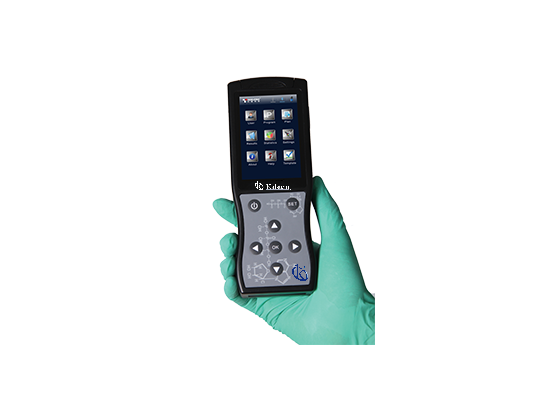
Troubleshooting common errors with the YR06071 ATP Hygiene Monitoring System
The YR06071 ATP Hygiene Monitoring System is a cutting-edge tool designed to facilitate efficient and accurate hygiene monitoring across various environments. As with any sophisticated equipment, users may encounter occasional errors or operational challenges. This article delves into common troubleshooting scenarios, providing detailed insights to maintain optimal performance.
Understanding the YR06071 ATP Hygiene Monitoring System
| Specification | Details |
|---|---|
| Model | YR06071 |
| Dimensions | 189mm x 70mm x 35mm |
| Weight | 280g |
| Detection Limit | 10-16 moles of ATP |
| Detection Deviation | ±5% or ±5 RULs |
| Self-Calibration Time | 15s or 60s |
| Real-Time Detection Time | 10s per test |
| Memory Capacity | 256 test plans, 256 user IDs, 2000 test programs, 10000 results |
| Communication Interface | USB, Bluetooth |
| Test Repeatability | 8%-20% |
| Correlation Coefficient | R2≥0.995 |
| Power Supply | Rechargeable Battery |
| Operating Time | Continuous work for 8 hours, standby for 600 hours |
| Operating Temperature | 5-40℃ |
| Operating Humidity Range | 20-80% |
Common Symptoms and Troubleshooting Steps
Below are detailed troubleshooting steps categorized by common symptoms encountered while using the YR06071 ATP Hygiene Monitoring System.
Equipment does not power on
If the unit does not power on, several potential causes and solutions may be considered:
- Low Battery: Ensure the device is charged. Connect to a power source and allow charging for at least 30 minutes.
- Faulty Power Source: Try a different charging cable or USB port to rule out power source issues.
- Internal Malfunction: If the device remains unresponsive, contact technical support for further assistance.
Error code E-03 displayed
Error code E-03 typically indicates a malfunction in the sensor or detection process. Follow these steps:
- Check Sensor Connections: Inspect the sensor for any loose connections or damage. Ensure it is properly attached.
- Perform Calibration: Run the self-calibration process by following the instructions in the user manual.
- Reset the Device: Power off and restart the device to reset any transient errors.
Inconsistent readings
Inconsistent test results may arise from several factors. Consider the following corrective actions:
- Sample Contamination: Ensure that samples are not contaminated during collection or testing. Use fresh and clean testing swabs.
- Environmental Factors: Check if the testing environment adheres to the required temperature and humidity conditions.
- Device Maintenance: Regularly clean the device and calibrate as per the schedule to maintain accuracy.
Symptom-Cause-Solution Matrix
| Symptom | Possible Cause | Recommended Solution |
|---|---|---|
| Equipment does not power on | Low battery or faulty power source | Charge the battery or check power sources |
| Error code E-03 displayed | Malfunction in sensor | Check sensor connections and perform calibration |
| Inconsistent readings | Sample contamination or environmental factors | Use clean samples and check operating conditions |
Frequently asked questions
What types of tests can the YR06071 perform?
The YR06071 is designed to measure the presence of ATP on surfaces, allowing for quick evaluation of hygiene levels and detection of potential biological contaminants.
Is the YR06071 easy to use?
Yes, the YR06071 is intuitively designed. Its display allows results to be seen within seconds, and it offers Bluetooth and USB connectivity, making it user-friendly in any professional environment.
How long does the battery last on the device?
The device features a rechargeable battery that provides up to 8 hours of continuous work or 600 hours on standby, ideal for extended working hours.
What should I do if the device shows an error code?
Refer to the troubleshooting section of the user manual for specific error codes. Follow the recommended steps to diagnose and rectify the issue.
How can I ensure accurate results with the YR06071?
To ensure accurate results, conduct regular maintenance, keep the device calibrated, and perform tests under controlled environmental conditions.
For a personalized quote on the YR06071 ATP Hygiene Monitoring System, please reach out for assistance.
If you are looking for a fusion of innovation and quality, you have come to the right place. At Kalstein, we offer you the luxury of exploring our exclusive catalog of laboratory equipment. We manufacture every device to the highest standards of excellence. Our intuitive and seamless online purchasing channels are designed for your convenience, securing the most competitive prices. Hesitate no longer — we bring science to life, it is time to become part of our community.