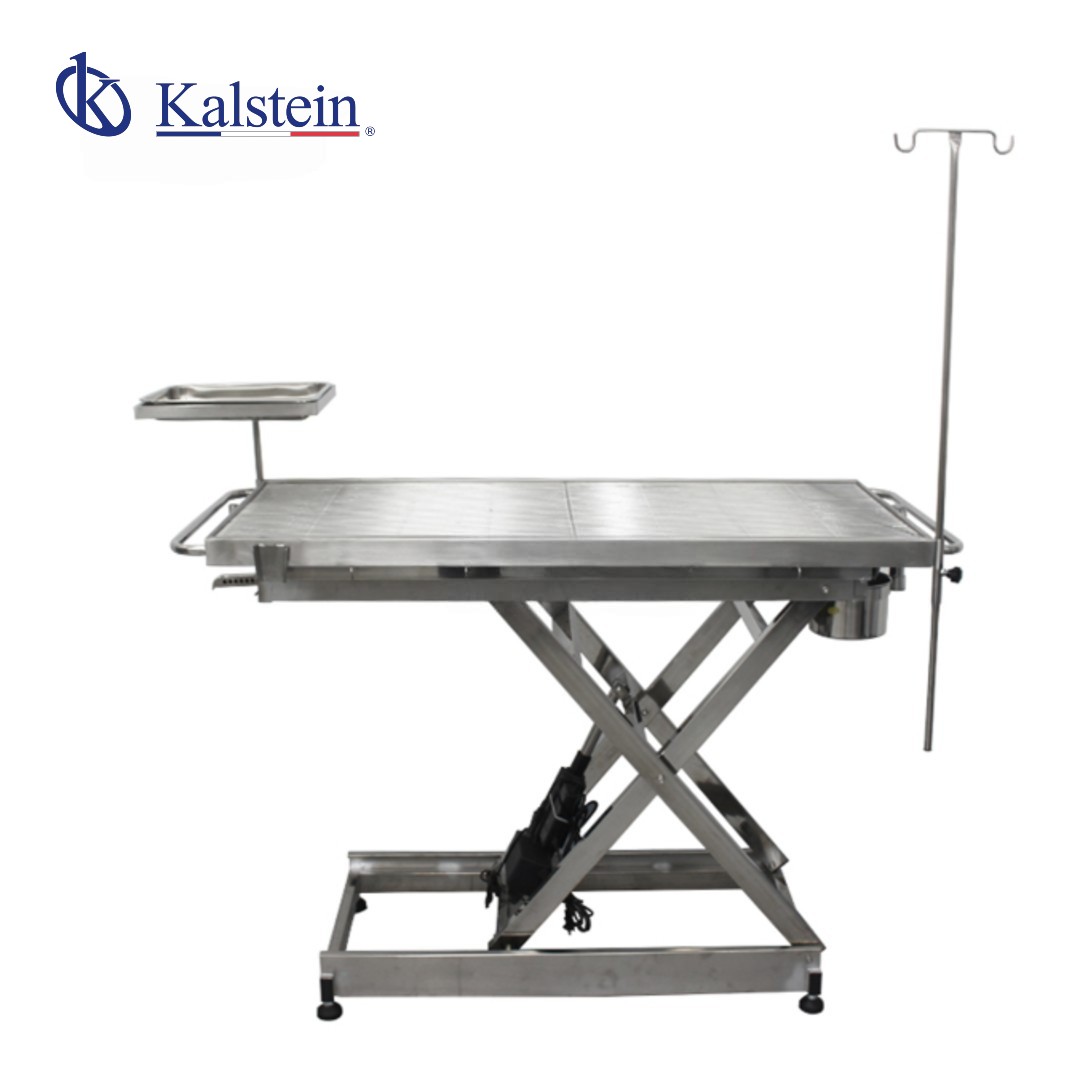
Troubleshooting Common Issues with the YR06695 Veterinary Operating Table
The YR06695 Veterinary Operating Table is a highly functional piece of equipment designed for veterinary practices and surgical centers. Despite its robust construction and advanced features, users may encounter common issues during operation. This guide delves into frequent troubleshooting by symptom, providing practical solutions to ensure the YR06695 operates optimally at all times.
Understanding the YR06695 Veterinary Operating Table
The YR06695 is constructed from high-quality 304 stainless steel, designed to withstand the rigors of a veterinary environment while maintaining hygiene. It features advanced mechanical characteristics and an ergonomic design, making it suitable for a variety of surgical procedures. The table's functionality includes an adjustable height system, a mobile mesh surface, and an anti-corrosive finish.
Technical Specifications of the YR06695
| Parameter | Features |
| Model | YR06695 |
| Material | 304 Stainless Steel (Corrosion-resistant/Acid-proof/Rust-proof) |
| Elevation System | Inclined support with firm locking |
| Elevation Control | Touch switch |
| Surface Options | Flat mesh / Circular arc mesh (Mobile) |
| General Property | Comprehensive anti-oxidation |
| Support Dimensions (cm) | L130 x W60 x H45-100 |
| Package Dimensions (cm) | 158 x 69 x 55 |
| Gross Weight | 90 kg |
Troubleshooting Common Symptoms
Equipment Does Not Power On
If the YR06695 does not power on, check the following:
- Power Connection: Ensure that the power cable is securely connected and the outlet is functioning.
- Fuse Status: Check the internal fuse for any signs of damage or burn. Replace if necessary.
Error Code E-03
This error may indicate a malfunction in the elevation system. To troubleshoot:
- Mechanical Blockage: Inspect for any physical obstructions in the elevation mechanism.
- Electrical Issues: Verify the connections to the lift motor and ensure it is operational.
Inconsistent Height Adjustments
If the height adjustments are inconsistent, consider these factors:
- Calibration: Ensure that the system is properly calibrated according to the user manual.
- Wear and Tear: Inspect the lift mechanism for signs of wear that may impede functionality.
Table Stability Issues
If the table is unstable during procedures:
- Leg Lock Mechanism: Check if the locking mechanism is engaged and functioning correctly.
- Surface Leveling: Ensure that the table is level and positioned on a stable surface.
Surface Damage or Wear
For any signs of damage to the table surface:
- Cleaning Procedures: Follow recommended cleaning guidelines to prevent corrosion or staining.
- Surface Replacement: If damage is extensive, consider contacting a supplier for replacement parts.
Symptom to Solution Matrix
| Symptom | Probable Cause | Solution |
|---|---|---|
| Equipment Does Not Power On | Power connection issue, damaged fuse | Check connections, replace fuse |
| Error Code E-03 | Mechanical blockage, electrical issues | Inspect for obstructions, check connections |
| Inconsistent Height Adjustments | Calibration issues, wear and tear | Re-calibrate, inspect lift mechanism |
| Table Stability Issues | Leg lock malfunction, surface instability | Engage locking mechanism, level table |
| Surface Damage | Poor cleaning, wear over time | Follow cleaning guidelines, consider replacement |
Frequently Asked Questions
What are the benefits of using 304 stainless steel in the YR06695?
304 stainless steel offers superior corrosion resistance and is acid-proof, making it highly hygienic and easy to sterilize — ideal for surgical environments.
How does the height adjustment feature work on the YR06695?
The height adjustment is facilitated by a touch switch controlling an inclined support, allowing the table to be raised from 45 cm to 100 cm with stability.
Can the surface type of the YR06695 be changed?
Yes, the YR06695 features an interchangeable mobile mesh, allowing users to choose between a flat surface or a circular arc mesh as needed for different procedures.
What should I do if the YR06695 displays an error code?
Check the user manual for the specific error code. Common steps include inspecting mechanical parts and ensuring proper electrical connections.
How can I maintain the YR06695 to prolong its lifespan?
Regularly clean the table using mild disinfectant solutions and ensure it is dried thoroughly after each use to avoid water stains and corrosion.
What is the weight of the YR06695, and does it affect its mobility?
The YR06695 weighs 90 kg, which may require a fixed location or assistance for initial transport due to its substantial weight.
Where can I find replacement parts for the YR06695?
Replacement parts for the YR06695 can typically be sourced from authorized distributors or directly from the manufacturer for optimal compatibility.
For further inquiries or to request a quote, please reach out to us for assistance.
If you are looking for a fusion of innovation and quality, you have come to the right place. At Kalstein, we offer you the luxury of exploring our exclusive catalog of laboratory equipment. We manufacture every device to the highest standards of excellence. Our intuitive and seamless online purchasing channels are designed for your convenience, securing the most competitive prices. Hesitate no longer — we bring science to life, it is time to become part of our community.