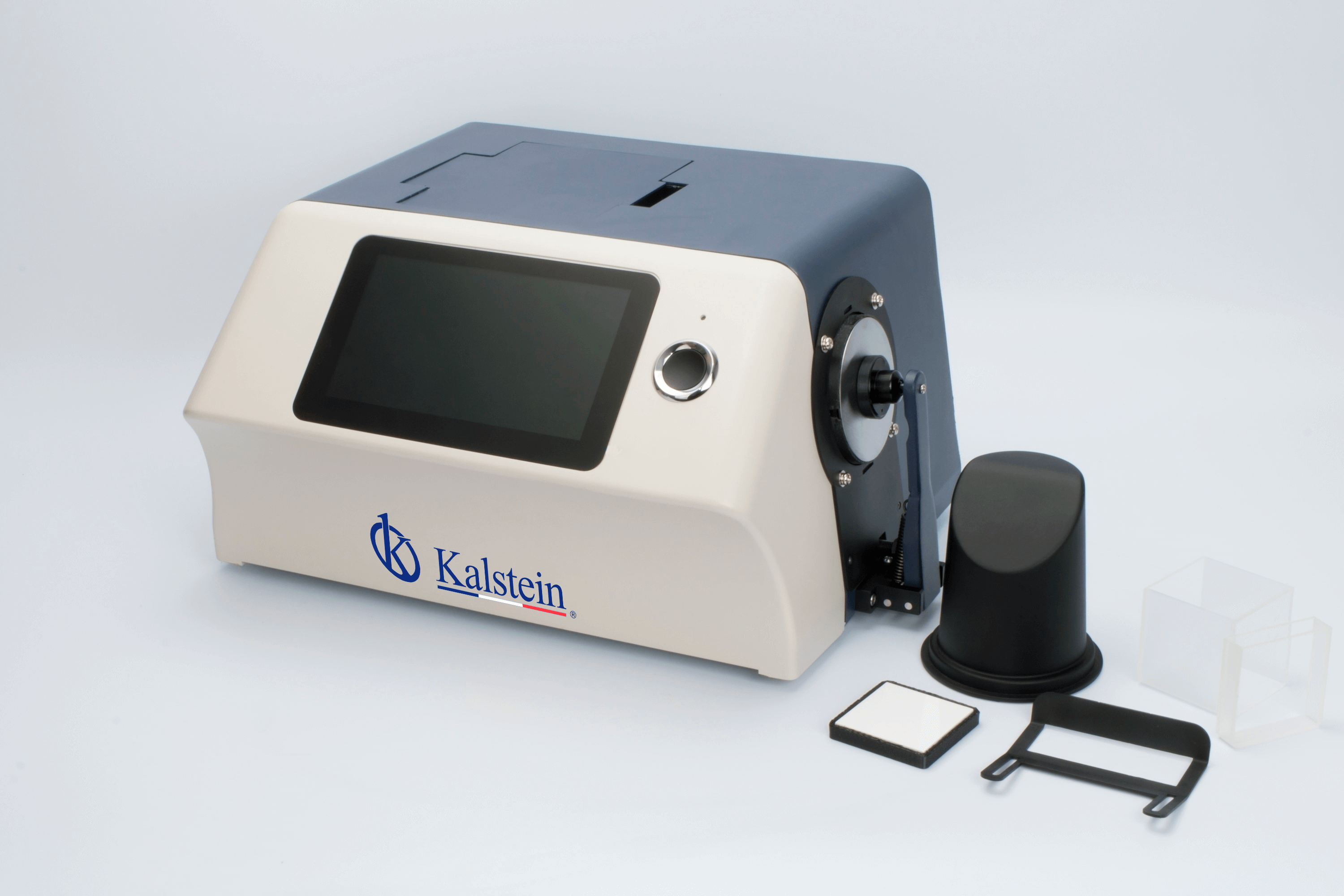
Installation and Commissioning Guide for the YR05479 Desktop Color Haze Meter
The YR05479 Desktop Color Haze Meter is an advanced instrument designed for precise measurement of haze, transmittance, and color properties in various materials. This guide provides a comprehensive overview of the installation and commissioning process, ensuring that users can achieve reliable measurements and optimal performance from the device.
Understanding the YR05479
The YR05479 utilizes patented optical geometry and a full-spectrum LED light source to perform its measurements. The device adheres to the CIE 15 standard, providing high accuracy for different applications, such as glass processing, plastics manufacturing, and laboratory analyses. Understanding the core functions and specifications of the YR05479 is crucial for effective installation and operation.
Unboxing Checklist
Before installation, it is essential to ensure that all components are present and in good condition. Here’s an unboxing checklist for the YR05479:
- YR05479 Desktop Color Haze Meter
- Power adapter (24V, 3A)
- User manual
- Quality control software (downloadable)
- USB cable
- Reflectance boards (white and black)
- Transmittance board (25.4 mm opening)
- Transmissive testing component
- Mini printer (optional)
Installation Process
Follow these steps for the proper installation of the YR05479:
1. Location and Setup
Choose a stable and vibration-free surface that allows easy access to the device. Ensure that the environment is within the recommended temperature range (0-40 °C) and humidity levels (not exceeding 85%). Provide adequate ventilation to prevent overheating.
2. Leveling and Anchoring
Use a spirit level to ensure that the YR05479 is perfectly horizontal. Adjust the feet of the meter accordingly to achieve balance and stability. Proper leveling is essential for accurate measurements.
3. Power Connection
Connect the power adapter to the device and plug it into a suitable power outlet. Ensure that the voltage and frequency match the specifications provided in the user manual.
4. Initial Calibration
Once powered on, the YR05479 will undergo an initial self-check. Follow the prompts on the 7-inch capacitive touchscreen for calibration procedures. This includes using the white reflectance board for standardization.
5. Network/USB Setup
If applicable, connect the device to a network via USB or Bluetooth. This setup is essential for data transfer and software updates. Ensure that the corresponding drivers are installed on your PC.
First Measurement and Validation
After setting up, it is crucial to conduct a validation measurement:
- Using the standard white board, perform a haze measurement to establish a baseline.
- Compare results with expected values outlined in the manual.
- Document any discrepancies for troubleshooting.
Common Setup Mistakes to Avoid
Being aware of common errors can prevent issues during the installation process:
- Incorrect leveling of the device can lead to inaccurate readings.
- Failure to complete initial calibration can affect measurement reliability.
- Ignoring environmental conditions (temperature, humidity) may compromise results.
Technical Data Table for the YR05479
| Specification | Details |
|---|---|
| Model | YR05479 |
| Optical Geometry | d/0 and 0/0 |
| Light Source | Full-spectrum LED, 360~780 nm |
| Integrating Sphere Size | Φ154mm |
| Measurement Time | Approximately 1.5 seconds |
| Weight | About 9.6 kg |
| Power Supply | 24V DC, 3A |
| Display | 7-inch TFT capacitive touchscreen |
| Storage Capacity | Standard: 5000; Sample: 20000 |
Frequently Asked Questions
What are the key features of the YR05479 Desktop Color Haze Meter?
The YR05479 features a full-spectrum LED light source, high-resolution CMOS image sensor, multiple measurement modes, and a user-friendly touchscreen interface. It is designed for high accuracy in measuring haze, transmittance, and colorimetric data.
How do I perform maintenance on the YR05479?
Regular maintenance involves cleaning the integrating sphere, checking the calibration regularly, and ensuring that all connections are secure. It is also important to keep the software updated for optimal performance.
Can the YR05479 measure haze in different materials?
Yes, the YR05479 is versatile and can effectively measure haze in various materials, including glass, plastics, and films, making it suitable for multiple industries.
What common errors might occur during operation of the YR05479?
Common errors can include power failure, incorrect readings due to environmental factors, and data storage issues. Proper installation and calibration can minimize these issues.
Where can I find replacement parts for the YR05479?
Replacement parts and consumables for the YR05479, including the power adapter and reflectance boards, can usually be ordered through the manufacturer’s website or authorized distributors.
How often should I calibrate the YR05479?
It is recommended to perform calibration at regular intervals and after any significant changes in measurement conditions to ensure consistent accuracy.
Can I connect the YR05479 to my computer?
Yes, the YR05479 can be connected to a computer via USB or through Bluetooth for data transfer and software updates, enhancing its usability in a laboratory setting.
If you are looking for a fusion of innovation and quality, you have come to the right place. At Kalstein, we offer you the luxury of exploring our exclusive catalog of laboratory equipment. We manufacture every device to the highest standards of excellence. Our intuitive and seamless online purchasing channels are designed for your convenience, securing the most competitive prices. Hesitate no longer — we bring science to life, it is time to become part of our community.